
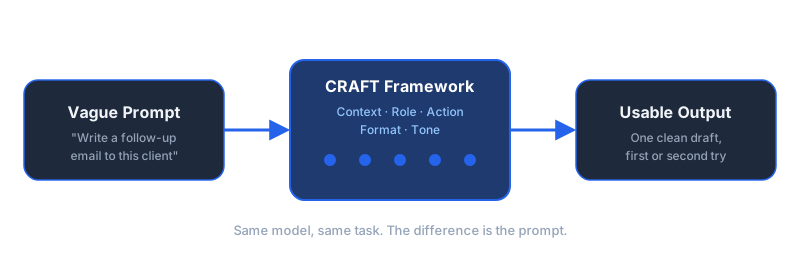
Most people writing prompts for business tasks type a single vague line, read the vague output that comes back, and conclude the model is not that useful. The model did not fail. The prompt did not give it enough to work with.
Dominik Gabor, an AI automation consultant based in the Netherlands, has written and refined business prompts across sales, support, reporting, and content for two years, testing 27+ AI tools along the way. The pattern holds across every one of them: a prompt with no context, no defined role, and no format instruction gets generic output, no matter how capable the underlying model is. A prompt built around five specific elements gets something you can use with light editing, most of the time.
This post lays out that five-part structure, the CRAFT framework, with real before-and-after examples for the tasks that eat the most time in a small or mid-size business: sales follow-up, meeting notes, support replies, and reporting.
Prompt engineering for business is the practice of structuring instructions to an AI model so the output is usable on the first or second try, rather than a generic draft that needs a full rewrite. It is less about clever tricks and more about giving the model what a new hire would need on day one: the situation, the role, the task, the format, and the tone.
Key Takeaways
- CRAFT is five elements, worked through in order: Context, Role, Action, Format, Tone. Skipping one is the most common reason output comes back generic.
- One task per prompt beats one prompt for everything. Stacking three requests into one line produces a worse result on all three than three separate, specific prompts.
- The format instruction is what makes output copy-paste usable. Without it, you get correct information in the wrong shape, which still costs you editing time.
- Team training is one afternoon, not a course. Walk through CRAFT, rewrite three real prompts together, then let people use it on real work.
- When the same prompt runs the same way every week, that is a signal to automate it, not a reason to keep typing it by hand.
Why Most Business Prompts Fail
Type "write a follow-up email to this client" into any AI model and you will get an email back. It will be grammatically correct, politely worded, and almost useless, because the model had to guess your company, your relationship with this client, what you actually want them to do next, and how formal your business sounds.
It guessed. Every business using AI casually runs into the same wall: the model is capable, the request was not specific enough to use that capability.
According to AI consultant Dominik Gabor, the most common mistake he sees in businesses starting with AI is treating the model like a search engine instead of a new team member. A search engine needs a query. A new employee needs context about the business, a clear brief, and a sense of what "done" looks like. Prompting a capable model like a search engine is why the output disappoints.
The cost of this rarely shows up as a single obvious failure. It shows up as a habit: someone types a vague request, gets a mediocre draft back, rewrites half of it by hand, and quietly concludes that AI "doesn't really work for this." Multiply that across a team writing emails, reports, and replies every day, and the gap between what the tool could produce and what it actually produces adds up to a lot of wasted rewriting, not because the tool is weak, but because nobody ever told it what a new hire would need to know.
The fix is not a longer prompt. It is a more complete one, built around the same five things you would tell a new hire before asking them to draft something on your behalf. That structure is what the rest of this post walks through, starting with the framework itself, then five real examples, then how to teach it to a team in an afternoon rather than a course.
The CRAFT Framework

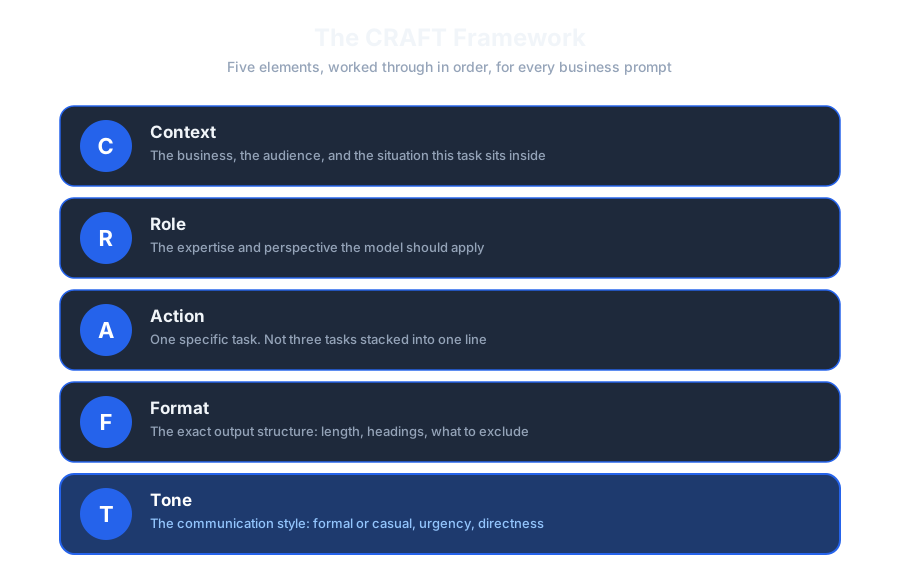
CRAFT breaks a business prompt into five parts. Working through all five, in order, is what separates a prompt that needs one light edit from one that needs a rewrite.
C: Context
Tell the model what business it is writing for and what situation this specific task sits inside. Not your entire company history, just what changes the output: the audience, the product or service, any constraint the model cannot see on its own (a client who is upset, a deadline that already slipped once, a policy the reply has to respect).
R: Role
Define the expertise and perspective the model should apply. "You are a senior B2B copywriter" produces different sentences than "you are a customer support lead handling a refund request," even for the same underlying facts. The role sets the vocabulary, the level of formality, and what the model treats as obvious versus worth explaining.
A: Action
Specify exactly one task. Not "help me with this client situation," which could mean five different documents, but "write the first follow-up email after a missed call, referencing the reason they gave for rescheduling." One action per prompt is the single highest-leverage change most people can make, covered in more detail below.
F: Format
Describe the output structure you actually need: length, whether it is bullet points or prose, what headings to use, what to leave out. Anthropic's own guidance for Claude makes this point directly: "Claude responds well to clear, explicit instructions," and recommends treating the model as a capable new employee who lacks context on your norms, rather than expecting it to infer the shape you want (Anthropic, 2026).
T: Tone
Set the communication style last, once the substance is defined: formal or casual, how much urgency to convey, how directive versus exploratory the language should read. Tone instructions are cheap to add and easy to skip, which is exactly why they are the most common missing piece in an otherwise decent prompt.
Five elements, but not five paragraphs. A well-built CRAFT prompt is usually four to eight sentences. The next section shows what that looks like against real business tasks.
CRAFT Applied: 5 Real Business Prompts
Each example below shows the vague version most people write first, then the same request rebuilt with CRAFT.
1. Sales Follow-Up Email
Write a follow-up email to a lead who hasn't responded.Context: We sell AI automation consulting to SMEs in the Netherlands and Germany.
This lead booked a call, then went quiet for 9 days after a good first conversation
about automating their invoice follow-up.
Role: You are a consultative B2B sales rep, not a pushy closer.
Action: Write a re-engagement email that references the invoice automation
problem specifically, not a generic "just checking in."
Format: 4 sentences max. No subject line. One clear next step at the end.
Tone: Warm, low-pressure, assumes they got busy rather than lost interest.The vague version could apply to any lead, in any industry, for any reason they went quiet. The CRAFT version can only produce one email, because it removed every place the model had to guess.
2. Meeting Summary
Summarize this meeting transcript.Context: Internal weekly ops meeting, transcript attached below.
Role: You are an operations assistant who tracks commitments precisely.
Action: Extract decisions made and action items only, do not summarize
general discussion that led nowhere.
Format: Two sections: "Decisions" (bulleted) and "Action items" formatted as
"[Owner]: [Task] by [Date]." If no date was stated, write "no deadline set."
Do not invent owners or dates.
Tone: Neutral, factual, no commentary.
Transcript: {{transcript}}The format instruction here is doing the real work. Without it, you get a paragraph that reads fine and that nobody can act on, because nothing is labeled as a task versus a note.
3. Customer Support Reply
Reply to this customer complaint.Context: Customer's order arrived 4 days late due to a courier delay,
not our fault, but it is their second late order this quarter.
Role: You are a support lead who owns the outcome, not a script reader.
Action: Acknowledge the specific pattern (second late order), not just
this one incident, and offer the standard delay credit.
Format: 3 short paragraphs. No corporate apology template language.
Tone: Direct and genuinely sorry, not defensive about the courier.Naming the pattern (second late order, not just this one) is a context detail a generic prompt would never surface, and it is the detail that makes the reply feel like it came from someone who actually read the account, not a template.
4. Weekly Report Draft
Write a weekly report from this data.Context: Weekly ops report for a 20-person company, read by the founder
in under 2 minutes on a Monday morning.
Role: You are a sharp junior analyst who highlights what changed, not
everything that happened.
Action: From the metrics below, identify the one headline number,
three observations, and one thing worth watching.
Format: Headline number as a single sentence. Three bullets. One
"watch this" line. Nothing else.
Tone: Direct, no hedging language, no "it appears that."
Metrics: {{data}}5. Content Repurposing Brief
Turn this blog post into some social posts.Context: This blog post targets SME owners considering AI automation
for the first time. It will be shared on LinkedIn to the same audience.
Role: You are a LinkedIn ghostwriter who writes in short, plain sentences,
not marketing copy.
Action: Extract the single most counterintuitive point from the post and
turn it into one LinkedIn post. Do not summarize the whole article.
Format: Under 150 words. Short paragraphs, one to two sentences each.
End with a question, not a call to action link.
Tone: Direct, slightly opinionated, no hashtags.
Post text: {{article}}Read all five examples back to back and the pattern is the same every time: context removes the guessing, role sets the voice, action narrows to one deliverable, format makes it usable without editing, tone makes it sound like the business it came from. If you are already running several of these as recurring prompts, it is worth turning the reliable ones into a saved, reusable setup rather than retyping the structure each time. A custom GPT built around one of these tasks keeps the CRAFT structure baked in permanently, so nobody has to remember it.
Common Mistakes That Undo a Good CRAFT Prompt
Learning the five elements is the easy part. These are the habits that quietly break a CRAFT prompt even after someone has learned the structure.
Mistake 1: Stacking three tasks into one prompt
"Write the email, then make it shorter, then make it more formal" asks the model to draft, edit, and restyle in a single pass. It will attempt all three and do none of them as well as three separate prompts would. If a task has more than one stage, treat it as a chain, covered in the next section, rather than one long instruction.
Mistake 2: Reusing the same prompt after the situation changed
A CRAFT prompt is built around a specific context. A support reply prompt tuned for a shipping delay does not automatically work for a billing dispute, even though both are "customer complaints." The context section has to change with the situation, not just the action.
Mistake 3: Over-specifying until the prompt is rigid
The opposite failure also happens. A prompt with fifteen constraints on tone, length, structure, and word choice leaves the model so boxed in that it cannot produce a natural sentence. Format and tone instructions should describe the shape you need, not dictate every phrase. If a prompt reads like a legal contract, it has usually gone too far.
Mistake 4: Never saving what worked
Teams that rebuild the same prompt from memory every time lose the specific wording that made it work the first time. Once a CRAFT prompt has produced usable output twice in a row (see the testing method below), save it somewhere the whole team can find it, not just in one person's chat history.
Mistake 5: Treating the first output as final
Even a well-built CRAFT prompt can miss something the first time. Reading the output and asking "what would I fix if a new hire handed me this" catches problems that a quick glance and a copy-paste miss. Skipping that check is where genuinely embarrassing output tends to slip through.
Mistake 6: Assuming a prompt trained on one model works identically on another
A prompt tuned against Claude for months can behave differently the first time someone pastes it into a different model, particularly around how strictly the format instruction is followed. Re-test, do not assume, whenever the underlying model changes. This is covered in more detail in the section on prompting across models below.
Mistake 7: Only training yourself, not the team
A founder or manager who learns CRAFT well and never shares it fixes one person's output. Every colleague still typing single vague lines is still getting single vague results, and still forming the same "AI doesn't really work" conclusion the founder disproved months ago for themselves. The one-afternoon team session in the next part of this post exists specifically to close that gap before it becomes a habit that is hard to unlearn.
Beyond Single Prompts: Building Prompt Chains
CRAFT handles a single task well. Some business work is not a single task: draft the email, then check it against a tone guide, then shorten it for mobile. Trying to cram all three steps into one prompt tends to produce a result that is mediocre at all three, because the model is juggling competing instructions in one pass.
A prompt chain breaks that into separate steps, each with its own CRAFT structure, where the output of one becomes the input to the next: draft, then critique against a specific standard, then revise based on the critique. Each step stays simple because it only has one job.
This matters more as tasks get longer. A single-step prompt is fine for a short email. A five-hundred-word report, a multi-section proposal, or anything that needs a review pass benefits from being broken into stages rather than requested in one breath. For a full walkthrough of building multi-step chains that hold up under real use, see the guide to advanced prompt chains.
The rule of thumb: if you would hand a task to two different people on your team (one to draft, one to review) rather than one person doing both in their head simultaneously, it is a chain, not a single prompt.
A short example: a draft step with Role set to "copywriter," followed by a review step with Role reset to "skeptical editor checking for jargon and unclear claims," catches problems that the copywriter role alone tends to miss, because it is genuinely a different lens on the same text, not the same model reading its own work twice in a row.
Prompt Engineering Across Claude, ChatGPT, and Gemini
The CRAFT structure is not tied to one model. Context, role, action, format, and tone matter regardless of which AI you are typing into, because the underlying problem, a model that cannot read your mind, is the same everywhere.
What changes between models is how literally they follow the format instruction and how much they ask versus assume. In Dominik's own day-to-day use, Claude tends to follow an explicit format instruction (exact headings, exact bullet structure) closely and rarely adds unrequested commentary, which is part of why it is the model referenced throughout this post's examples. Each provider publishes its own guidance for its models, and the specifics shift with every release, so the more durable approach is to keep the CRAFT structure fixed and test it directly on whichever model your team actually works in day to day, rather than assuming a prompt tuned on one model transfers exactly to another.
If your team is choosing between models for a specific automation rather than casual use, the trade-offs go beyond prompting style, into cost, context window, and integration options. The Claude vs. GPT-5.5 comparison covers that decision in more depth.
A CRAFT prompt does not need to be rewritten from scratch for each model, but a few habits transfer better than others when you switch:
| CRAFT element | What to double-check when you switch models |
|---|---|
| Context | Transfers directly. Business facts do not change based on which model reads them. |
| Role | Transfers directly, though some models lean more heavily into a persona than others once given one. |
| Action | Transfers directly, as long as it stays a single task rather than a stacked list. |
| Format | The most likely to need re-testing. How strictly a model honors an exact structure (headings, word caps, no bullet points) is the setting most worth verifying after a model change. |
| Tone | Usually transfers well, but re-read the first output after a switch. A tone instruction that reads as "direct" on one model can land as curt on another. |
In practice this means: keep the Context, Role, and Action sections of a working prompt as-is when you move it to a new model, and spend your re-testing time on Format and Tone specifically.
How to Train Your Team in One Afternoon

CRAFT does not need a course. It needs one working session, structured like this:
- First 15 minutes: Walk through the five elements with one example, live, on the screen. Show the vague version first, then rebuild it together.
- Next 30 minutes: Each person brings one prompt they already write regularly (an email type, a report, a reply template) and rebuilds it using CRAFT, out loud, with feedback from the group.
- Final 15 minutes: Everyone saves their rebuilt prompt somewhere the whole team can find it. A shared prompt library beats everyone reinventing the same structure separately.
That is the whole session. The skill sticks because people rebuilt their own real work, not a hypothetical example, and because they walk out with something they will actually reuse this week.
For Dutch and German SME teams that want to move faster, dictating a CRAFT prompt out loud rather than typing it removes a real friction point, since typing five structured sentences is where a lot of people give up and revert to one vague line. The post on voice dictation for AI prompting covers that setup for anyone who prompts more than a few times a day.
One thing to watch: after the first working session, prompts drift back toward vague within a week or two unless someone keeps the shared library visible and referenced. Revisit it briefly at a team meeting once, and it tends to hold.
What the First 30 Days Actually Look Like
The one-afternoon session starts the habit. What happens over the following month determines whether it sticks.
- Week 1: The training session itself. Everyone rebuilds one real prompt using CRAFT and saves it to the shared library. No new tasks assigned yet, people just use their rebuilt prompt on the work they were already doing.
- Week 2: Each person rebuilds a second recurring prompt on their own, without a group session, using the same five-part structure. This is where the habit either sticks or people quietly drift back to typing one vague line.
- Week 3: A short 15-minute check-in. Look at what got saved to the shared library, flag any prompt that is still producing generic output, and fix it together using the testing method below.
- Week 4: By now the team has a small library of working, reusable prompts for their most common tasks. This is the point to look at which of those prompts run the same way every time, since that repetition is the signal covered later in this post for when a prompt should become a full automation instead.
Nothing about this timeline requires new software or a training budget. It requires one afternoon, three short follow-ups, and a shared document everyone can actually find.
The Prompt Testing Method
A CRAFT prompt is not finished after one pass. Treat the first output as a draft of the prompt, not just a draft of the answer, and refine from there.
- Run it once on a real example from your business, not a hypothetical. Generic test data hides the gaps a real client name or a real number would expose.
- Read the output and ask what is missing or wrong, then trace it back to which of the five CRAFT elements was too vague. Wrong facts usually trace to Context. Wrong voice usually traces to Role or Tone. Wrong shape usually traces to Format.
- Fix the one element that caused the problem, not the whole prompt. Rewriting from scratch every time throws away what was already working.
- Run it again on a second real example to check the fix generalizes rather than just patching the one case you happened to test.
- Save the working version once it produces usable output twice in a row on different real inputs.
Most people skip step four and assume one good result means the prompt is done. It usually is not; the second test is what catches a fix that only worked because of something specific to the first example.
Worked Example: Fixing a Broken Prompt
Take a hypothetical case: an operations manager built a CRAFT prompt to draft weekly client status updates, and the first result came back too long and too formal for how the team actually writes to clients.
Context: Weekly client status update for an ongoing project.
Role: You are a project manager writing to the client.
Action: Summarize this week's progress.
Format: A short update email.
Tone: Professional.
Notes: {{notes}}Working through the diagnostic from the testing method: the facts in the output were correct, so Context was not the problem. The voice was too stiff, which points to Role and Tone, and the length was wrong, which points to Format. Two elements needed tightening, not a rewrite of the whole prompt.
Context: Weekly client status update for an ongoing project. This client
gets short, casual updates, not formal reports.
Role: You are the project manager who has worked with this client for
6 months and writes to them the way you'd message a colleague.
Action: Summarize this week's progress in plain language, no report
structure.
Format: 4 sentences max. No headers, no bullet points, one paragraph.
Tone: Casual, direct, like a quick message, not an email template.
Notes: {{notes}}Nothing about the task changed between the two iterations. What changed was how precisely Role, Format, and Tone described the actual relationship with this specific client, which is the level of detail CRAFT is built to hold.
When Prompts Aren't Enough
A well-built CRAFT prompt still needs someone to open the tool, paste in the input, and run it. That is fine for work that varies each time and needs a human glancing at the output anyway. It stops making sense once a prompt runs the same way, on the same trigger, every single week, with a person only there to copy and paste.
That repetition is the signal to move from a prompt you run manually to a workflow that runs itself: the same CRAFT-structured instruction, wired to a trigger, running without anyone opening a chat window. The prompt does not change. What changes is who runs it.
Take the meeting summary prompt from earlier in this post. Run once a week for a single recurring call, it is a fine use of a saved CRAFT prompt: someone pastes in the transcript, checks the output, and sends it. Run after every one of thirty client calls a week across a team, the same prompt becomes a bottleneck, not because the prompt is wrong, but because a person is now the slowest part of a process that no longer needs one. That is the moment to wire the transcript tool, the model, and the destination (Notion, email, Slack) together directly, so the CRAFT instruction fires automatically on every new transcript instead of waiting for someone to remember to run it.
The test is simple: if you can predict exactly which prompt you will run tomorrow and on what trigger, before tomorrow arrives, it belongs in an automated workflow. If the input changes enough each time that a person genuinely needs to read it first, it stays a prompt you run by hand.
If several of the prompts you built in this post's team session fall into the first category, running on a schedule or a trigger rather than by hand, the complete guide to AI automation for SMEs walks through how to identify which ones to automate first and how to wire them up.
Not sure whether a task belongs in a prompt or a full automation? Book a free AI Profit Assessment, 30 minutes, and you'll leave with a clear answer for your specific tools and workflow.
Frequently Asked Questions
What is prompt engineering for business?
Prompt engineering for business is the practice of structuring instructions to an AI model so the output is usable on the first or second try, instead of a generic draft that needs a full rewrite. In a business setting this means giving the model context about your company, a defined role to play, one specific action, the format you need, and the tone that fits the audience.
What is the CRAFT framework for prompts?
CRAFT is a 5-part structure for business prompts: Context (the situation and audience), Role (the expertise the model should apply), Action (the one specific task), Format (the exact output structure), and Tone (the communication style). Working through all five in order produces more consistent, usable output than an unstructured request.
How long does it take to learn prompt engineering?
Learning the CRAFT structure itself takes about an hour: reading it, seeing the before-and-after examples, and rewriting two or three of your own recurring prompts. Getting fluent enough that structured prompting becomes automatic typically takes a few weeks of regular use, which is why a short team training session followed by real use on real tasks works better than a single workshop.
Is prompt engineering still relevant with more advanced AI models?
Yes. Newer models follow instructions more reliably, but they still cannot read a business owner's mind. A model with no context about your company, your audience, or your preferred format will still default to generic output. The skill has shifted from finding clever tricks to simply being clear and specific, which is if anything easier to teach than earlier prompt engineering advice.
Should I use the same prompts for ChatGPT, Claude, and Gemini?
The CRAFT structure works across all three because it is about clarity, not model-specific tricks. What differs is how literally each model follows formatting instructions and how much it infers versus asks for confirmation. Test a prompt that matters on the model your team actually uses day to day rather than assuming behavior transfers exactly.
The Bottom Line
Vague prompts produce vague output, on every model, every time. CRAFT (Context, Role, Action, Format, Tone) fixes that by giving the model what a new hire would need before drafting anything on your behalf. It takes one afternoon to teach a team, a few minutes to rebuild a recurring prompt, and it is the same structure whether you are writing a sales email by hand today or wiring the same instruction into an automated workflow next month.
Start with one prompt you already write every week. Rebuild it with CRAFT. Run it twice. Save it. Then do the next one.
None of this requires new software, a training budget, or waiting for a better model. The five examples in this post, the common mistakes, and the worked fix all use the same structure you can apply to whatever you are drafting today, whether that is an email, a report, or a reply to a customer who is not having a great day.
References
Anthropic. (2026). Prompting best practices: Claude platform docs. https://platform.claude.com/docs/en/build-with-claude/prompt-engineering/claude-prompting-best-practices
The Complete Picture
Save or share this, it's the full framework in one view.
Not sure which prompts are worth systemizing?
Some recurring prompts belong in a shared library. Some belong in a custom GPT. Some belong in a full automation. In 30 minutes we map your specific recurring tasks against the right level of system for each one.
- Which of your prompts should become a saved template
- Which tasks are ready for a custom GPT
- Which ones should stop being a prompt and become automation
30 minutes. No obligation. No pitch unless you ask for one.
Or grab the free resources first →
About Dominik Gabor
AI Automation Consultant based in the Netherlands. Dominik helps small and mid-size businesses implement AI automation, from prompt structure to full workflow systems. He has spent 2+ years testing 27+ AI tools daily, and writes to give business owners the exact, practical starting points that most AI content skips over.