
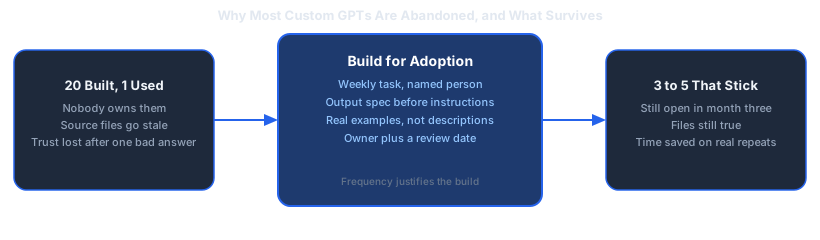
Ask a team how many custom GPTs they built last year. Then ask how many they still open. The second number is usually zero or one.
That gap is the real story with custom GPTs, and almost nobody writing about them addresses it. Most custom GPTs stop being used within a few weeks of being built, not because the technology fails but because nobody owns them and the files behind them go stale. Dominik Gabor, an AI automation consultant working with European SMEs, has spent two years testing 27+ AI tools across real business workflows, and the pattern holds across every company size: the constraint is adoption, not capability.
So this is not another list of twenty custom GPTs you could build. It is five that survive contact with a real team, and the rules that keep them alive.
A custom GPT is a saved version of ChatGPT configured with fixed instructions, uploaded reference files, and optional connections to your other tools. Instead of re-explaining a task every time, you open a custom GPT that already knows your process, your source documents, and the exact output format you want.
Key Takeaways
- Five that stick beats twenty that impressed everyone in the demo. The limit is how many your team still opens in month three, not how many you can build.
- The use cases that survive share a shape: a repeated task, a defined output, a named owner, and a human who reviews the result.
- Abandonment is a maintenance failure, not a technology failure. Stale source files produce confidently wrong answers, and trust does not come back.
- Build on process documents, not on personal data. Customer lists and CVs change the GDPR position entirely.
- Run it in parallel for two weeks. If the output still needs heavy editing at the end, fix the spec or kill it.
What a Custom GPT Actually Is (and Is Not)
A custom GPT is a wrapper around the same model everyone else uses. What changes is the starting context.
Plain ChatGPT begins every conversation from nothing. You paste the background, explain the format, correct it twice, and get something usable on the third try. Do that task weekly and you are re-doing the same setup fifty times a year.
A custom GPT fixes the setup once. The instructions, the reference files, and the output format live inside the GPT, so the person using it types one line and gets the format they wanted. That is the entire value proposition, and it is narrower than most articles imply.
What a custom GPT is not: it is not an automation. It does not run on a schedule, it does not trigger from an event, and it does not update your systems. Someone has to open it and ask. If you need something to happen without a human present, you need a workflow tool like n8n, not a custom GPT. Confusing these two is the most common reason a build disappoints.
The 5 Custom GPT Use Cases That Survive

These five share a structure. Each replaces a repeated task that has a defined output, is done by a named person, and produces something a human reviews before it leaves the building.
1. The Proposal and Quote Drafter
The task: turning a discovery conversation into a first-draft proposal.
Most SMEs write proposals from the last proposal, copying an old document and editing the parts that changed. That works, and it also means every proposal inherits the errors of the one before it.
A proposal GPT loaded with your service descriptions, your pricing structure, and three of your best past proposals turns a set of call notes into a structured first draft. The salesperson still edits it. That is the point: the GPT removes the blank page and the copy-paste archaeology, not the judgment.
The time at stake here is substantial. Companies often spend 20 to 40 hours responding to a single formal request for proposal, and tools of this kind work by matching requirements to existing content and generating draft responses rather than starting each one fresh (Synergy Labs, 2026). How much of that you recover depends heavily on how standardised your proposals already are.
Why it sticks: proposals are painful, frequent, and owned by someone with a direct incentive to go faster.
2. The Internal Policy Answer Desk
The task: answering the same twenty questions about holiday policy, expense rules, and onboarding steps.
This is the use case with the clearest published evidence behind it. Organisations that have embedded custom GPTs into daily operations, including Asana and Boston Children's Hospital, report saving employees an average of one hour per day (MostDomain, 2026).
For a 5-100 person company the absolute numbers are smaller, but the shape is identical. Whoever answers "how do I book time off" for the eleventh time this month is doing work a document could do, if the document were searchable in plain language.
Why it sticks: the questions never stop arriving, so the GPT gets used whether or not anyone champions it.
The failure mode to plan for: the handbook changes and the GPT does not. Put a calendar reminder on the file, not on the GPT.
3. The Meeting-Notes-to-Document Converter
The task: turning a recording or rough transcript into something a client or colleague can read.
Professionals spend hours each week writing up meeting notes and documentation, and converting transcripts into structured documents with summaries, action items, and decisions recovers a meaningful share of that time (Synergy Labs, 2026).
The version that works in practice is narrow. Not "summarise this meeting" but "produce a client-facing recap in our four-section format, with owners and dates on every action item, flagging anything that sounded like a commitment." The narrower the output spec, the less editing afterwards.
Why it sticks: the input arrives automatically from whatever note-taker you already run, so there is no new habit to build.
4. The Customer Reply Drafter
The task: first-draft responses to common inbound questions.
Note the word draft. A custom GPT that sends customer replies without review is a liability, not an efficiency gain. A custom GPT that produces a draft in your tone, referencing your actual policies, which a human approves in fifteen seconds instead of writing in four minutes, is straightforward value.
Load it with your top thirty real questions and your best real answers. The tone transfers from examples far better than from adjectives; ten real replies teach it more than a paragraph describing how you like to sound.
Why it sticks: volume. The person handling inbox duty feels the difference on day one.
5. The Structured Research Brief
The task: pre-call research on a prospect, a supplier, or a market.
Before a sales call, someone spends twenty minutes reading a website, a LinkedIn page, and a news search, then writes nothing down. The next person repeats it.
A research GPT with a fixed brief format turns scattered reading into a consistent one-pager: what they do, how they make money, recent signals, three questions worth asking. Consistency is the win here more than speed, because it makes the output comparable across prospects and useful to someone who was not on the call.
Why it sticks: it produces an artefact other people want, which is the most reliable adoption mechanism there is.
Find out which tasks justify a custom GPT
Building the wrong GPT costs a week and gets abandoned. In 30 minutes we work out which of your repeated tasks are frequent and well-defined enough to be worth it, before you build anything.
- Which weekly tasks actually justify a build
- Who needs to own each one to keep it alive
- Where a workflow tool fits better than a GPT
30 minutes. No obligation. No pitch unless you ask for one.
Or grab the free resources first →Why the Other Twenty Get Abandoned

Every use case above is unremarkable. That is deliberate. The interesting question is why teams that build fifteen GPTs end up using one.
Nobody owns it. A GPT built by whoever was enthusiastic that week belongs to no role. When its files go stale there is no one whose job it is to notice. Name an owner at build time or do not build it.
The source files rot. This is the killer. A pricing GPT running on last quarter's rate card does not fail loudly, it answers confidently and wrongly. One bad answer in front of a customer and the team stops trusting the tool permanently. Trust is expensive to earn back and cheap to lose.
It was built for a task nobody actually repeats. A great deal of enthusiasm goes into GPTs for jobs done twice a year. The value of a custom GPT scales with frequency. If the task happens monthly or less, plain ChatGPT is fine.
The output still needs so much editing that people go back to doing it manually. Usually a symptom of instructions that describe a vibe instead of a format. Specify the sections, the length, and the things it must never do.
It duplicates something the team already does quickly. Watch for GPTs that automate the fun part of a job rather than the tedious part. People do not adopt tools that take away work they enjoy.
The GDPR Question Nobody Asks First
Here is the question that comes up in every European SME conversation and almost never appears in the listicles: can you legally put your company documents into a custom GPT?
The honest answer is that it depends on your plan and what you upload, and it needs settling before the first file goes in rather than after.
The distinction that matters is between process documents and personal data. A custom GPT built on your service descriptions, your proposal templates, your internal policies, or your product documentation contains no personal data and raises no real issue. That covers four of the five use cases above.
The moment you upload a customer list, a CV pile, support tickets containing customer details, or anything with names and contact details in it, you are sending personal data to a third-party processor. Under GDPR that requires a lawful basis and the right contractual arrangement with that processor. Consumer-tier accounts generally do not give you the contractual position you need; business and enterprise tiers change that picture, and the terms differ by provider and by plan.
For Dutch and German SMEs specifically, this tends to surface late, usually when someone in finance or legal asks a reasonable question two months after the tool went into daily use. That is an expensive moment to discover you need to unwind something.
The practical default that avoids the whole problem: build custom GPTs on process knowledge, not on people. Where you genuinely need a GPT to handle records about individuals, treat it as a data protection decision with your own legal advice, not a tooling decision. This is an engineering perspective and not legal advice, and anything contractual should go past your own lawyer.
How to Build One That Lasts
Five steps. This is the whole method.
- Pick a task done at least weekly by a named person. Frequency justifies the build. If you cannot name who will use it, stop here.
- Write the output spec before the instructions. Decide exactly what a good result looks like: sections, length, tone, and the things it must never do. Most weak GPTs are weak because the builder skipped this.
- Feed it real examples, not descriptions. Three to ten genuine past outputs beat any amount of prose about your style.
- Assign an owner and a review date. Put the review on the calendar of whoever owns the source documents. This single step prevents the most common failure.
- Run it in parallel for two weeks. Keep doing the task the old way alongside the GPT. If the output still needs heavy editing at the end of two weeks, fix the spec or kill it.
Kill it is a real option and an underused one. A custom GPT that is not clearly saving time after a fair trial is costing attention.
For prompt structures you can adapt for step two, there are templates on the free resources page. If you are weighing custom GPTs against a full workflow tool, the comparison between Claude and GPT-5.5 for business automation covers where each one fits, and connecting a custom GPT to your CRM covers the integration side once you have one worth connecting.
Frequently Asked Questions
How many custom GPTs should a business have?
Three to five, owned by named people, is a better target than twenty. The constraint is not how many you can build but how many your team will still open in month three. Every GPT past the point where someone owns it and uses it weekly is maintenance cost with no return.
What is a custom GPT and how is it different from just using ChatGPT?
A custom GPT is a saved configuration of ChatGPT with fixed instructions, uploaded reference files, and optional connections to other tools. Plain ChatGPT starts from nothing every conversation. A custom GPT starts already knowing your process, your format, and your source documents, so the person using it does not have to re-explain the job each time.
Do custom GPTs actually save time?
They do when they replace a repeated task with a defined output, and they do not when they replace a task people were already doing quickly. The savings come from removing setup and rework, not from the model writing faster. A GPT that drafts a first-pass document someone still edits saves real time; a GPT that answers questions someone could already answer does not.
Why do most custom GPTs get abandoned?
Because nobody owns them and the source files go stale. A GPT built on last quarter's pricing sheet gives confidently wrong answers, people get burned once, and they stop trusting it. Abandonment is almost always a maintenance failure rather than a technology failure.
Are custom GPTs safe for company data under GDPR?
It depends on which plan you use and what you upload, and it is a question to settle before the first file goes in rather than after. Uploading documents containing customer or employee personal data to a consumer-tier account means sending personal data to a third-party processor without the contractual basis GDPR requires. Business and Enterprise tiers change the contractual position, but the safer default is to build GPTs on process documents rather than personal data.
The Bottom Line
Custom GPTs are worth building for a small number of frequent, well-defined tasks with a named owner and a maintained source file. The technology is rarely the reason they fail; the absence of ownership almost always is.
Five that work beats twenty that impressed everyone in the demo. Pick the task someone does every week, write the output spec before the instructions, give it an owner, and set a date to check whether the files behind it are still true.
The question worth asking is not what you could build. It is which one your team will still be opening in three months.
References
MostDomain. (2026, March 11). ChatGPT business use cases proven to work in 2026. https://www.mostdomain.com/blog/chatgpt-business-use-cases/
Synergy Labs. (2026, January 9). Top GPT wrapper use cases for business automation in 2026. https://www.synergylabs.co/blog/best-gpt-wrapper-automation-2026
The Complete Picture
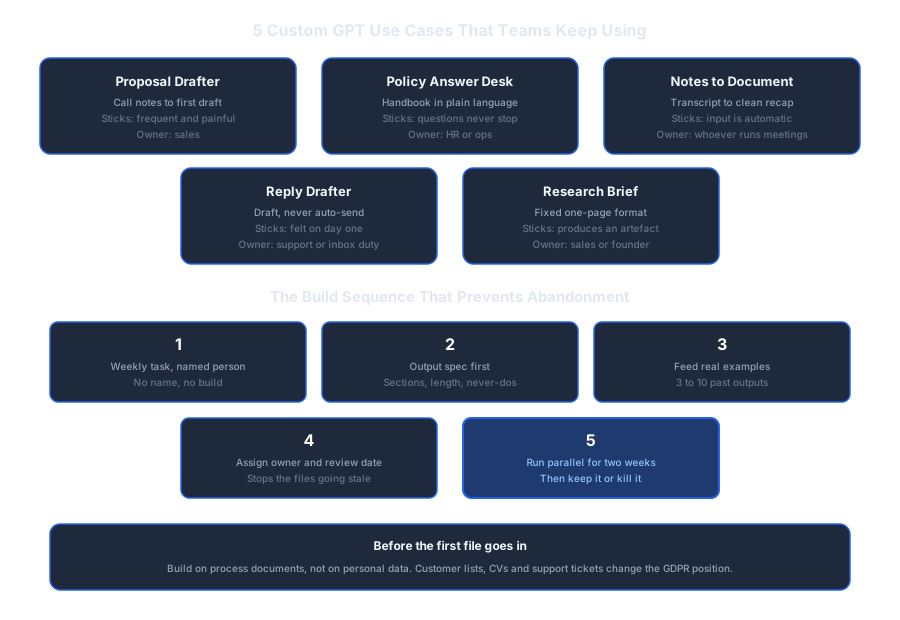
Save or share this: the 5 use cases and the build sequence in one view.
Find Out Which Tasks Justify a Custom GPT
Every business has a different set of tasks worth building for. Book a free 30-minute AI Profit Assessment and leave with a clear answer: which of your repeated tasks justify a custom GPT, who should own each one, and where a workflow tool fits better.
Most teams find the useful list is shorter than they expected, and that is the point.
Book Your Free AI Profit Assessment Or start with the free AI workflow audit checklist →
About Dominik Gabor
AI Automation Consultant based in the Netherlands. Dominik helps small and mid-size businesses work out which repeated tasks are worth building a custom GPT for, and which are better handled by a workflow tool or left alone. He has spent 2+ years testing 27+ AI tools daily, and writes to give business owners the exact, practical starting points that most AI content skips over.