
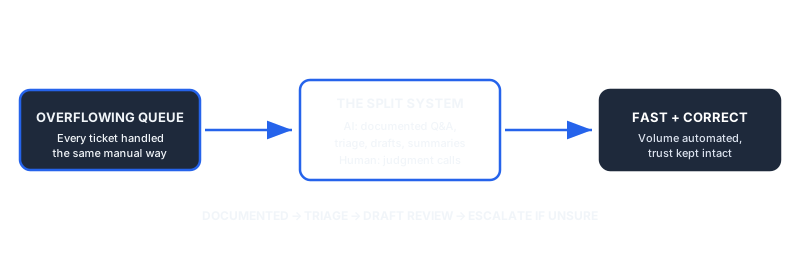
AI customer support automation gets sold as an all-or-nothing decision: either you bolt a chatbot onto your website, or you keep everything manual. Neither extreme works for most SMEs. The businesses that get it right treat automation as a layer, not a replacement, and they are deliberate about exactly which tasks cross that line and which never do.
Dominik Gabor, an AI automation consultant based in the Netherlands, sees the same mistake repeatedly when SMEs first automate support: they optimize for fewer tickets reaching a human, instead of optimizing for the customer getting a correct answer fast. Those are not the same goal, and confusing them is what makes automation feel cheap to the people on the receiving end of it.
AI customer support automation uses an AI model to handle part of the incoming support workload: answering common questions, sorting and routing tickets, drafting responses, or summarizing context for a human agent. It is not a single tool decision. It is a set of choices about which specific tasks the AI owns end to end, which it assists with, and which it never touches.
Key Takeaways
- Automate the repeatable layer: documented answers, ticket triage, first-response drafts, and thread summaries.
- Keep the judgment layer human: complaints, exceptions to policy, and anything the AI flags as low-confidence.
- A visible escape hatch matters more than the automation itself. Customers forgive a bot that says "let me get a person" fast. They don't forgive a bot that pretends it understands.
- Measure resolution quality, not ticket deflection. Fewer tickets reaching a human is a vanity metric if satisfaction drops.
- Cost scales with build approach: DIY tooling, a Starter Build from €1,000 excl. BTW for one automation in two weeks, or the full system as an AI Operating System priced on the value it creates.
The Real Question: What to Automate vs. What to Keep Human
"Should we automate customer support?" is the wrong question. Every SME with more than a handful of support requests a week already benefits from automating some part of it. The right question is narrower: which specific tasks, in which specific order, and where exactly does the AI hand off to a person.
The useful way to sort tasks is by two questions: how often does it happen, and how bad is a wrong answer? High-frequency, low-stakes tasks (a shipping status question, a password reset, a return policy lookup) are the obvious first automation targets. Low-frequency, high-stakes tasks (a formal complaint, an unusual refund request, anything involving a legal or safety concern) should stay with a person regardless of how good the AI gets.
For the broader picture of how support automation fits alongside the rest of a business's automation stack, the complete guide to AI automation for SMEs covers the other layers most businesses eventually add. This post stays narrower: the support inbox specifically, and where the human line has to hold.
The Automatable Layer: 5 Support Tasks AI Handles Well

1. Answering documented questions. If the answer already exists in a help center, policy page, or FAQ, AI can retrieve and phrase it correctly almost every time. This is the safest and highest-ROI starting point.
2. Ticket triage and routing. Reading an incoming message, classifying its type (billing, technical, shipping, complaint), and routing it to the right queue or person. This alone removes a meaningful chunk of manual sorting before a human ever reads the message.
3. First-response drafting. AI drafts a reply using the customer's message and your knowledge base, then a human reviews and sends it. This keeps a person in the loop while cutting the time to write from scratch.
4. Thread and history summarization. Before a human agent picks up a ticket, AI summarizes the prior conversation and any relevant account history, so the agent starts informed instead of re-reading everything.
5. After-hours and overflow coverage. Handling straightforward questions outside business hours or during volume spikes, with a clear message that anything more complex will get a human reply at the next available slot.
Each of these tasks shares a trait: the AI's output is easy for a human to verify quickly, and a mistake is cheap to catch before it reaches the customer, or cheap to fix if it does.
The Human Layer: What Should Never Be Fully Automated
Complaints and escalations. A customer who is already frustrated needs to feel heard, not routed through another automated reply. Hand these to a person immediately, and make the handoff visible so the customer knows it happened.
Exceptions to stated policy. Any request that falls outside your documented rules (a refund past the deadline, a custom accommodation) needs human judgment, because the AI has nothing reliable to reason from.
High-value or high-risk accounts. A large client or a legally sensitive situation is not where you want to find out the AI misunderstood the context.
Anything the AI flags as low-confidence. A well-built system says "I'm not sure" instead of guessing. Treat that signal as a hard stop, not a suggestion.
Customers are not neutral about this. In a Gartner survey of 5,728 customers, 64% said they would prefer companies did not use AI in customer service at all, and 53% would consider switching to a competitor over it. Their top concern was not wrong answers. It was that AI would make it harder to reach a person (Gartner, 2024). That is the layer above: keep the human path visible and the objection mostly disappears.
The line between these two layers is not fixed forever. It should move as you gather evidence of what the AI handles reliably, but it should move deliberately, one task at a time, not all at once because a demo looked impressive.
Find out where your automation line should sit
Every support inbox has a different mix of repeatable and judgment-heavy requests. In 30 minutes we map yours and tell you honestly which tasks are safe to automate first and which should stay with your team.
- Which support tasks to automate first
- Where the human line needs to hold
- Whether DIY or done-for-you fits your team
30 minutes. No obligation. No pitch unless you ask for one.
Or grab the free resources first →How to Build It Without Losing the Human Touch

- Start with your existing tickets, not a blank page. Pull the last month of support requests and sort them into "documented answer exists," "needs judgment," and "unclear." The first category is your automation starting point.
- Write the AI's instructions the way you'd brief a new hire. What it can answer directly, what it should draft for review, and what it should immediately hand off. Vague instructions produce vague, overconfident answers.
- Build the escalation path before the automation. Decide exactly how and when a conversation reaches a human, and make that path visible to the customer at every stage, not hidden behind a menu.
- Run it in shadow mode first. Let the AI draft responses that a human still reviews and sends for 1-2 weeks before it replies unsupervised on anything. This catches the failure patterns while they're still cheap.
- Review a sample of automated resolutions weekly, not just the ones that got escalated. Good automation setups degrade quietly if nobody checks the ones that seemed to go fine.
For a longer walkthrough of the audit-to-build sequence that applies to support automation as much as any other workflow, see the step-by-step migration guide for SMEs.
What This Costs vs. What It's Worth
The investment scales with how much of the setup and prompt-writing you do yourself versus hand off. There is no universally right answer, only a fit question: does your team have the hours this month, and how much does a badly automated support inbox cost you in lost trust if it goes wrong?
| Path | What you get | Cost | Best for |
|---|---|---|---|
| DIY | You configure the AI layer yourself on top of your existing helpdesk tool | Mostly your own time | Teams with 5-10 spare hours this month and a documented knowledge base already |
| Starter Build | One support automation (triage, or first-response drafts) built on your own tools, with a before/after measurement in your numbers, in two weeks | From €1,000 excl. BTW, fixed before we start | Owners who want one named result fast before deciding on the full system |
| AI Operating System | The full support automation built, deployed, and documented | Priced per project on the value it creates, fixed before work starts | Businesses that want the shadow-mode testing and escalation design handled end to end |
The full system is priced against a measured baseline: the hours your team spends on support today, at your own loaded rate, agreed before anything is built. The price is fixed before work starts, and the Starter Build measurement is usually the first line of that baseline. The pricing page shows how the price is set.
For a deeper breakdown of how AI automation pricing works across different scopes, see how much AI automation actually costs in 2026.
The Failure Mode Nobody Warns You About
The most common way AI customer support automation goes wrong isn't a bad AI answer. It's a business that keeps expanding what the AI handles because ticket deflection numbers look good, without checking whether resolution quality is holding up.
Ticket deflection (fewer requests reaching a human) is easy to measure and easy to present as a win. Resolution quality (did the customer actually get what they needed) is harder to measure and easier to ignore. The businesses that get burned by AI support automation are almost always optimizing the first number while the second one quietly erodes.
The cost of getting this wrong is not a bad afternoon. Gartner's 2026 survey of 3,566 customers found only 27% would try a chatbot again after one negative experience, and 87% say access to a human agent is essential when a company uses AI in service. Gartner's own advice to service leaders: prioritize reliability over reach (Gartner, 2026). Start with the issue types the AI resolves reliably, and widen scope only once the numbers hold.
The fix is structural, not a mindset shift: build the review step into the process from day one (see step 5 above), and treat "the AI handled it and nobody complained" as a hypothesis to check, not a result to celebrate. A customer who gives up and goes to a competitor instead of complaining never shows up in your ticket-deflection number.
For businesses operating across the Netherlands and the wider EU, there's a compliance dimension worth naming directly too: any AI system handling customer data needs to run on GDPR-compliant tooling from the start, with a clear record of what the AI can access and what a human reviews, rather than retrofitted after the fact.
Frequently Asked Questions
What customer support tasks can AI actually automate well?
AI handles repeatable, well-documented tasks best: answering questions covered in a knowledge base, triaging and routing incoming tickets, drafting first-response replies for a human to approve, and summarizing long email threads before a person picks them up. These are high-frequency, low-ambiguity tasks where a wrong answer is easy to catch and correct.
Should a small business fully automate customer support with AI?
No. Full automation is the fastest way to damage trust with customers who have an unusual, emotional, or high-value request. The workable model for most SMEs is AI handling the repeatable first layer and routing anything ambiguous, upset, or high-stakes to a person, with a visible and fast path to a human at every step.
How much does AI customer support automation cost for a small business?
A DIY setup using existing tool subscriptions costs mostly your own time. A Starter Build, one support automation delivered in two weeks, starts at €1,000 excl. BTW. The full system is an AI Operating System, priced per project on the value it creates: the price is set after the hours have been measured and fixed before any work starts.
Will customers notice if support is automated?
They will notice if it is done badly: generic answers, no clear way to reach a person, or a bot that cannot recognize when it is out of its depth. They rarely notice good automation, because the response is fast, specific, and correct, and a human is one click away the moment the question gets complicated.
What is the biggest risk of AI customer support automation?
Over-automating: routing too much to AI without a visible, fast escape hatch to a human. The businesses that get burned are the ones that measure success by how few tickets reach a person, instead of how satisfied the customer was with the resolution, automated or not.
The Bottom Line
AI customer support automation works when it's treated as a layer, not a replacement: AI owns the repeatable, well-documented volume, a person owns judgment and anything emotional or high-stakes, and the handoff between the two is fast and visible. Judge success by resolution quality, not by how few tickets reach a human. Get that backwards and the automation quietly costs you customers instead of saving you hours.
Start with the tasks that already have a documented answer. Build the escalation path before you build the automation. Run it in shadow mode before it replies unsupervised. That order, more than the tool you pick, is what determines whether customers notice the automation at all.
The Complete Picture
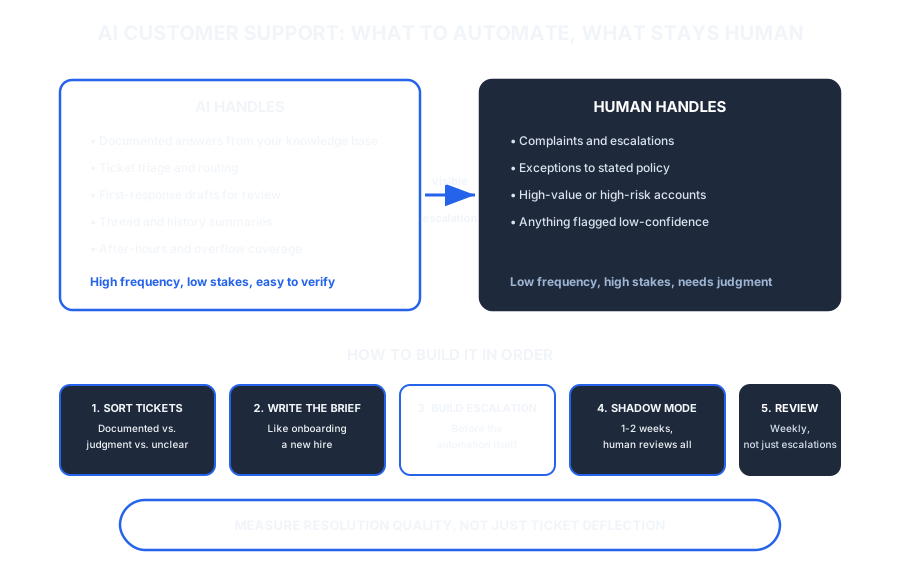
Save or share this: the full automate-vs-human breakdown in one view.
References
- Gartner. (2024, July 9). Gartner survey finds 64% of customers would prefer that companies didn't use AI for customer service [Press release]. gartner.com
- Gartner. (2026, September 2). Gartner survey finds only 27% of customers would try a chatbot again after a negative experience [Press release]. gartner.com

About Dominik Gabor
AI Automation Consultant based in the Netherlands. Dominik helps small and mid-size businesses implement AI automation, from support ticket triage to full done-for-you builds. He has spent 2+ years testing 27+ AI tools daily, and writes to give business owners the practical line between what AI should own and what a person always should.