
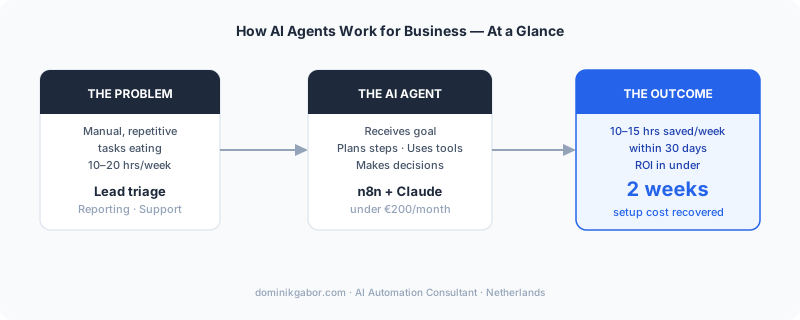
Most business owners hear "AI agents" and picture science fiction: autonomous robots, enterprise software costing six figures, or something that needs a full dev team to run. None of that is accurate anymore.
Dominik Gabor, an AI automation consultant in the Netherlands, has deployed AI agents for European SMEs ranging from 10 to 250 employees. The typical result: 15-25 hours saved per week, per business, within the first 30 days of deployment.
AI agents are not a 2027 technology. They are running in production today, in businesses that look exactly like yours.
AI agents are autonomous software systems that receive a goal, plan the steps needed to complete it, use external tools (email, databases, APIs), and finish the task without constant human input. Unlike standard automation workflows, agents can adapt mid-process when conditions change or unexpected input arrives.
This guide covers what agents actually are, which four types deliver real ROI for SMEs right now, and how to deploy your first one this week.
What AI Agents Actually Do (And What They Don't)
The word "agent" gets applied to everything from a simple ChatGPT plugin to a fully autonomous workflow engine. For this guide, the working definition is: an AI agent is software that can plan, act, and self-correct across multiple steps to complete a goal.
Three things separate an agent from regular automation:
- A regular automation follows a fixed path. An agent chooses the path.
- A regular automation breaks when input is unexpected. An agent handles variations.
- A regular automation does one thing. An agent orchestrates multiple tools in sequence.
For a Dutch or German SME, this means an agent can handle the entire lead qualification process. Not just send one email when a form is filled out. The full process.
What agents cannot do: replace judgment on genuinely novel situations. They are excellent at high-volume, repeatable tasks with clear criteria. They are not good at one-off strategic decisions or situations with no prior pattern to learn from.
The practical scope for 2026: automate the predictable, delegate the repeatable, keep humans on the exceptions.
The 4 Types of AI Agents That Deliver ROI for SMEs Right Now
Not all agents are production-ready for small businesses. Enterprise-grade agentic platforms (Salesforce Agentforce, ServiceNow) are powerful but priced accordingly. For SMEs, four categories are delivering measurable results today with tools that cost under €200/month to operate.

1. Lead Qualification Agents
These agents monitor your inbox or contact form, extract key details (company size, industry, role, urgency signals), score the lead against your criteria, draft a personalized first response, update your CRM, and notify your sales rep. All within 60 seconds of the inquiry arriving.
Tools: n8n + Claude + HubSpot or Notion
Time saved: 3-5 hours per week for a business receiving 20+ inbound leads
Build time: 4-6 hours the first time; reusable template after that
2. Research and Reporting Agents
These agents pull data from multiple sources (Google Analytics, your CRM, a spreadsheet), synthesize it into a structured summary, write the weekly or monthly report, and send it to the right person on schedule.
Nobody builds the report manually. Nobody remembers to run it. It just arrives.
Tools: n8n + Claude + Google Sheets + Gmail
Time saved: 2-4 hours per week
Best fit for: Operations managers, agency owners, consultants who produce recurring reports for clients
3. Content Repurposing Agents
Feed in one piece of long-form content: a blog post, a meeting transcript, a client proposal, a webinar recording. The agent produces LinkedIn posts, an email newsletter summary, and a FAQ document, all formatted and ready for human review.
For businesses publishing content consistently, this one agent removes 60-70% of the manual reformatting work.
Tools: Claude API + n8n or Make
Time saved: 3-6 hours per week
Best fit for: Founders, consultants, and marketing teams with active content pipelines
4. Customer Support Triage Agents
These agents read incoming support requests, classify them by type and urgency, draft a response for simple and common cases, and escalate complex ones with a full context summary already written for the human who picks it up.
The result: 60-80% of simple support requests resolved without human involvement. The remaining 20-40% reach your team with context already assembled, cutting resolution time in half.
Tools: Claude + n8n + your helpdesk (Intercom, Freshdesk, or even a monitored Gmail inbox)
Time saved: 4-8 hours per week
Best fit for: E-commerce, SaaS, and service businesses with recurring support patterns
| Agent Type | Setup Complexity | Weekly Time Saved | Best Tool Stack |
|---|---|---|---|
| Lead Qualification | Medium | 3-5 hrs | n8n + Claude + CRM |
| Research/Reporting | Low | 2-4 hrs | n8n + Claude + Sheets |
| Content Repurposing | Low | 3-6 hrs | Claude API + n8n |
| Customer Support Triage | Medium | 4-8 hrs | Claude + n8n + helpdesk |
If you want to see how this maps to your specific workflows, book your Free AI Profit Assessment. 30 minutes, no cost, no obligation.
What This Looks Like in Practice: A Realistic Example

To make this concrete: imagine a 35-person consultancy receiving 25-40 inbound inquiries per week through their website contact form. Each inquiry requires someone to read it, decide if it is worth pursuing, draft a first response, and log it in the CRM. This is a pattern I see regularly across professional services businesses in the Netherlands.
That kind of task eats 6-8 hours a week of a senior consultant's time. Not a junior admin. A senior consultant at €150/hour.
A lead qualification agent built for this scenario does the following in sequence:
- Reads the incoming form submission
- Extracts: company name, industry, team size (if mentioned), stated problem, urgency language
- Scores the lead on a 1-10 scale against three criteria: industry fit, company size, problem clarity
- If score is 7+: drafts a personalized first response referencing the specific problem they described and proposes two meeting times
- If score is 4-6: drafts a lighter qualification email asking two clarifying questions
- If score is under 4: sends a polite redirect to a self-serve resource
- Logs the full interaction to Notion with score, reasoning, and draft response
- Sends a Slack notification to the responsible person with a one-line summary
Realistic build time for this setup: 5 hours. Monthly operating cost: under €40. Time saved per week: 6 hours.
The consultant reviews drafted responses, approves or edits, and sends. That takes 20-30 minutes instead of 6 hours.
One important note: for Dutch businesses, GDPR compliance is non-negotiable. Any agent that processes personal data needs a data minimization step (retain only what is needed for the qualification decision) and a clear retention limit (90 days is a reasonable default for lead logs). Both are straightforward to build in from the start. Far harder to retrofit later.
For a deeper look at the specific automations that complement this kind of agent, see 5 AI automations every business should run.
How to Deploy Your First AI Agent This Week (5 Steps)
These steps apply whether you are building a lead qualification agent, a reporting agent, or a support triage agent. The pattern is the same.
Step 1: Pick one process with clear inputs and outputs
Do not start with "AI strategy." Start with a specific process: one form, one inbox, one report. The process should have a clear trigger (something arrives), a clear output (something is sent or logged), and happen at least 10 times per week. Volume matters. Low-volume processes do not justify the setup effort.
Step 2: Map it manually first
Write out every step the human currently does, in plain language. Do not skip this. The agent will replicate these steps. If the human steps are unclear, the agent steps will be too. Most businesses discover hidden decision points they never articulated during this exercise.
Step 3: Identify which steps need judgment vs. which are mechanical
Mechanical steps (copy data from form to spreadsheet, send a template email) go directly into n8n as regular automation nodes. Steps requiring judgment (is this lead worth pursuing? what is the customer actually asking for?) go to Claude with a well-written prompt. Keep the two categories separate.
Step 4: Build the skeleton, test with real data
Build the n8n workflow with Claude API calls for the judgment steps. Run it against 20-30 real historical inputs from your business. Check every output manually. The goal is not perfection. The goal is to find where the agent's judgment diverges from yours.
Step 5: Add a human review step, then expand
For the first two weeks, every agent output routes through a human approval step before anything is sent or logged permanently. After two weeks of review, you will know exactly which outputs to trust without review and which still need a human check. Expand autonomy incrementally.
You can download prompt templates for the Claude steps in Step 3 from the free AI prompt library. The workflow analysis and classification prompts are directly applicable.
Frequently Asked Questions
What are AI agents for business?
AI agents are autonomous software systems that receive a goal, break it into steps, use tools like email, databases, and APIs, and complete tasks without constant human input. Unlike standard automation, agents can adapt mid-process when conditions change, making decisions rather than just following a fixed path.
How do I deploy AI agents in my business?
Start with one high-volume, repetitive process: lead qualification, weekly reporting, or customer support triage. Map the current steps manually, then rebuild them using an agent framework like n8n plus a language model like Claude. Deploy on one real workflow before scaling to others.
What are the best AI agent tools for small business?
For SMEs, the most practical stack is n8n (workflow orchestration) plus Claude (reasoning and writing). n8n handles the integrations and logic routing; Claude handles any step requiring judgment, drafting, or classification. Make.com is a simpler alternative to n8n if your team has no technical background.
What ROI can AI agents deliver?
A lead qualification agent saves 3-5 hours per week for a business receiving 20+ inbound leads. A reporting agent saves 2-4 hours. A content repurposing agent saves 3-6 hours. A three-agent system commonly frees 10-15 hours per week within 30 days. At €100/hour for the time recovered, that is €4,000-€6,000 per month in reclaimed capacity.
Are AI agents safe for small businesses?
Yes, with the right guardrails. Keep humans in the loop for high-stakes decisions. Agents handle classification, drafting, and data movement. Humans approve anything that goes to a client or touches financial data. For EU businesses, build GDPR compliance in from the start: data minimization, retention limits, and clear documentation of what the agent processes and why.
The Bottom Line
AI agents for business are no longer enterprise-only. For SMEs running repeatable, high-volume processes, a single well-built agent returns its setup cost in under two weeks and compounds value every week after. The bottleneck is not the technology. It is picking the right process to start with.
IBM and Google Cloud will tell you agents are the future of enterprise operations. That is true. What they will not tell you is that a 20-person SME in Rotterdam or Munich can deploy a production-ready agent this week with a €30/month tool stack and one focused afternoon of setup time.
The businesses that move first on this will have a meaningful operational advantage by the end of 2026. Not because agents are magic. Because they eliminate the manual overhead that quietly costs 10-20 hours per week in every growing business.
Start with one process. Build one agent. Verify the outputs. Then scale.
Not sure which process to start with? The 5 no-code AI automations any SME can implement in 2 weeks breaks down the five highest-impact starting points with exact tool stacks and realistic time estimates.
Once your first agent is running, the natural next step is connecting it to the rest of your stack. That architecture (memory, live data, tools, skills, workflows, and routines) is what turns isolated agents into a system that runs without you. For a practical breakdown of how those layers compound, see The Claude OS Stack: 6 layers that recover 14 hours per week.
The Complete Picture
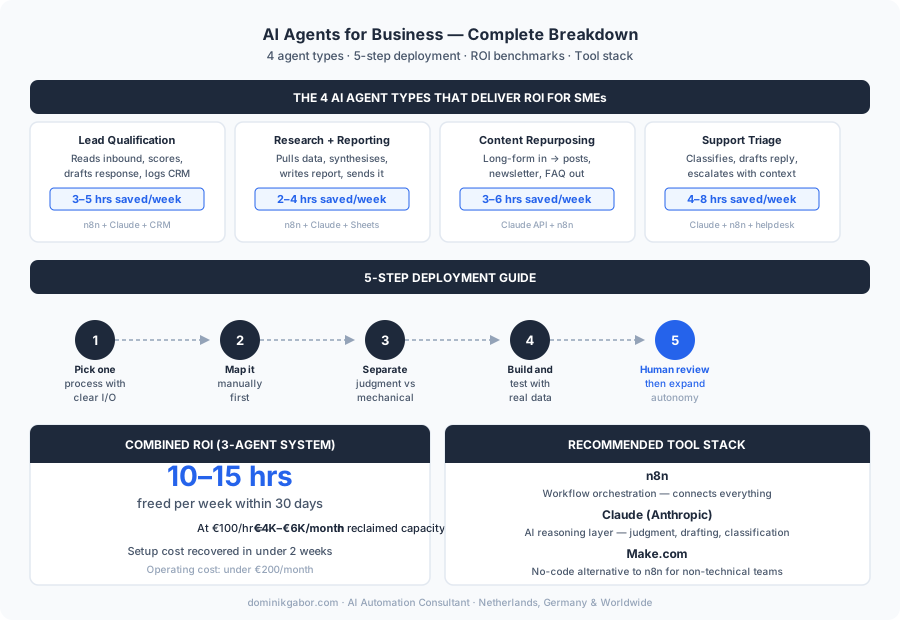
Save or share this, it's the full breakdown in one view.
Want to Know Which Process in Your Business to Automate First?
Book a free 30-minute AI Profit Assessment. We map your current workflows, identify the highest-ROI automation candidates, and you leave with a specific action plan for your first agent. No sales pitch. Just the map.
Most business owners are surprised by how much of their week is automatable once we map it out together.
Book Your Free AI Profit Assessment Or start with the free AI prompt library, includes workflow analysis templates →Share This Article
If this was useful, share it with a business owner who's still running everything manually.

About Dominik Gabor
AI Automation Consultant at TwinScale AI in Leeuwarden, the Netherlands. Dominik helps small and mid-size businesses implement AI Operating Systems, from lead response automation to strategic daily briefings. He tests 27+ AI tools daily.