
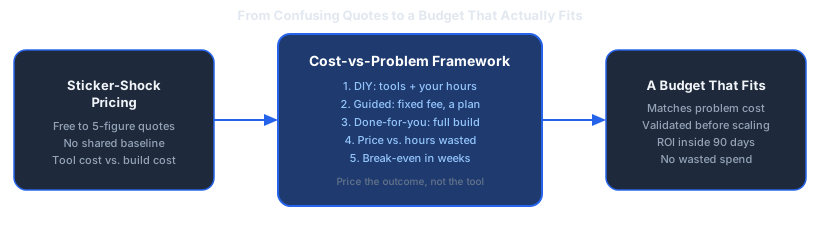
Ask five people what AI automation costs and you get five different numbers, because they are all pricing different things. One is quoting a monthly software subscription. Another is quoting a freelancer's day rate. A third is quoting what an agency charges for a full build. None of them are wrong. They are just answering a different question than the one you asked.
Dominik Gabor, an AI automation consultant based in the Netherlands, gets this question in almost every first call: "so what does this actually cost me?" The honest answer is that AI automation cost is not one number, it is a choice between three different ways of buying the same outcome, and the right choice depends on how much of the work you want to do yourself.
This post breaks down what actually drives AI automation pricing in 2026, the three tiers SMEs choose between, and how to budget based on what your current manual process is costing you, not on a number a vendor made up.
AI automation cost covers two separate things: a one-time build cost to design, connect, and test the workflow, and an ongoing running cost for the AI and workflow tool subscriptions once it's live. A third, invisible cost sits underneath both: your own time spent learning, building, or supervising the process. Any pricing conversation that only mentions one of these three is incomplete.
Key Takeaways
- Three pricing tiers, not one number: DIY (tool cost only), Guided (a fixed one-time fee), and Done-for-you (a build fee plus optional ongoing support).
- Budget against the problem, not the tool: price the automation against what the manual process currently costs you in wasted hours, not against what feels affordable in isolation.
- "Free" DIY still has a price: it's your own unpaid hours, and those hours are usually worth more than the fee you're trying to avoid.
- ROI is fast when the scope is right: an automation that removes 2 hours a week at the Dutch average of €47.90 an hour is worth about €5,000 a year.
- Start with a free diagnosis, not a purchase: know which process is worth automating before you spend on tools or a consultant.
Why AI Automation Pricing Feels Like a Guessing Game
Search "AI automation cost" and the answers span from nearly free to well into five figures. That range is not a sign that the market is broken. It reflects three genuinely different products being sold under the same label.
A subscription AI tool sells you a piece of software. A consultant selling a one-time strategy session sells you a plan. A consultant selling a full build sells you a finished, working system, deployed and documented, with someone accountable if it breaks. Comparing the price tags without comparing what each one actually delivers is where most of the confusion comes from.
There's a simpler way to think about it. Every AI automation purchase is really a trade-off between money and time: the less money you spend, the more of your own time the project consumes, and the more money you spend, the less of your time it takes. Once you see it as that trade-off, the "confusing" pricing landscape sorts itself into three clear tiers.
The Three Ways to Buy AI Automation

1. DIY: You Build It, the Tools Are the Only Cost
What it is: You pick the AI and workflow tools yourself, sign up for their subscriptions, and build the automation using free tutorials, documentation, and trial and error.
What you pay for: Tool subscriptions only. No consulting fee, no build fee. To put real numbers on it: n8n, a common workflow tool, lists its Cloud Starter plan at €20 a month billed annually for 2,500 workflow executions, and its Pro plan at €50 a month for 10,000 (n8n, 2026). Model usage is billed separately and per token, so it scales with how much you actually run: OpenAI lists GPT-4o at $2.50 per million input tokens and $10.00 per million output tokens, with its smaller GPT-4o mini at $0.15 and $0.60 (OpenAI, 2026). For a single low-volume workflow that lands in the tens of euros a month, not the hundreds.
What it actually costs you: Your own unpaid hours, often far more of them than expected, especially on your first automation.
Best for: A single simple workflow, and an owner who genuinely wants to learn the tools rather than just get the outcome.
2. Guided: A Fixed Fee for a Plan and a Path
What it is: A one-time, structured deep-dive where a consultant maps your current processes, identifies the highest-impact automations, and hands you a concrete action plan. Dominik's version of this is free: the Free AI Profit Assessment, a 30-minute call that names one process worth automating and puts a number on it: the hours it takes each week and what those hours cost.
What you pay for: Expertise and prioritization. You still build it yourself afterward, but you're no longer guessing what to build first.
Best for: Owners who want an expert diagnosis before committing to a bigger spend, or who are happy to DIY the build once they know exactly what to build.
3. Done-for-You: Someone Else Builds, Deploys, and Documents It
What it is: A consultant designs, builds, tests, deploys, and documents the automations for you, end to end. Dominik's version comes in two sizes. A Starter Build is one automation on your own tools, live in two weeks, from €1,000 excl. BTW, and you pay the second 50% only when it runs as agreed in writing. The AI Operating System is a complete, custom-built setup covering folder structure, memory, connected tools, and routines, delivered in 22-30 days and priced per project on the value it creates. Both prices are fixed before work starts; the pricing page has the details.
What you pay for: Speed, reliability, and zero hours of your own time spent learning tools you'll only ever touch once.
Best for: Businesses where the owner's time is better spent running the business than learning workflow software, or where the automation needs to touch multiple tools reliably from day one.
Ongoing support after a done-for-you build sits in a fourth category worth naming separately: the AI Growth Engine, a monthly partnership for continuous optimization and new automations, priced from €2,000 a month. This is optional, and only makes sense once the first system is live and proving its value.
The Real Question: What Is the Problem Costing You?
Here's the mistake almost every business makes when budgeting for AI automation: they ask "can I afford this?" instead of "can I afford to keep doing this manually?"
Flip the question and the math changes completely. A process that eats hours of a team's time every week isn't free just because nobody's invoicing for it. Whatever those hours were costing you before, in salary, in delay, in mistakes, that's the real baseline you're pricing the automation against, not some abstract sense of "is €1,000 a lot of money."
This is the same logic behind the Time × Frequency way of prioritizing: a task that's slow but happens once a quarter is a low priority. A task that's only mildly annoying but happens 40 times a week is where the money is. Price the automation against the second kind of task, and the build price starts to look small next to the yearly cost of doing it by hand.
Why "Free" DIY Is Often the Most Expensive Option

DIY looks free because no invoice ever arrives. But the hours spent watching tutorials, hitting configuration errors, and rebuilding a workflow that broke silently last week are not free. They're just unbilled, and they're usually the owner's or a senior team member's hours, which are the most expensive hours in the business.
None of this means DIY is a bad choice. For a genuinely simple, single-tool automation, and an owner who enjoys the technical side, DIY is fine and often the right call. The mistake is treating "free" as a synonym for "cheapest." It's only cheapest if your time, and the time of whoever else gets pulled in to help troubleshoot it, is worth less than the fee you're avoiding. For most SME owners, it isn't.
The build the machine, not just the work philosophy applies directly here: the goal isn't to personally become good at wiring together automation tools. The goal is a system that runs the process without you in it. Sometimes that system is one you build yourself. Often it's faster and cheaper, once your time is priced in, to have it built for you.
How to Estimate Your Own ROI Before You Spend Anything
You don't need a consultant to run this first pass. Here's the version you can do on a napkin before you spend a cent:
- Pick one repetitive task. Something that happens weekly, follows a predictable pattern, and doesn't require judgment calls.
- Estimate the hours it costs per week. Be honest, and include the hours spent by whoever currently does it, not just the owner.
- Multiply by that person's real hourly cost to the business. Not their salary divided by working hours alone, include the overhead of employing them.
- Compare that weekly number to the tier you're considering. A DIY tool subscription, a free AI Profit Assessment, a Starter Build from €1,000 excl. BTW, or a full AI Operating System priced on the value it creates.
- Ask how many weeks it takes to break even. If the answer is under 12 weeks, the automation is very likely worth building, regardless of which tier you choose.
Take a hypothetical example: a 20-person operations team where two people each lose roughly 4 hours a week to manually compiling a weekly report from three different tools. That's 8 hours a week, every week, indefinitely, until someone automates it. Whatever tier removes that bottleneck, DIY, Guided, or Done-for-you, is being compared against a cost that compounds every single week it isn't fixed. That's the comparison that actually matters, not the sticker price in isolation.
Budgeting by Company Size
There's no universal budget line, but there is a sensible order of operations regardless of company size:
- Start free. A 30-minute Free AI Profit Assessment identifies where you're losing €4,000-€8,000 a month in manual process waste, with no obligation, before you commit to anything.
- Validate with a fixed, small spend. A Starter Build puts one automation live in two weeks, from €1,000 excl. BTW, and you pay the second 50% only when it runs as agreed in writing.
- Commit to a bigger build once the case is proven. The AI Operating System is priced per project on the value it creates, set after the first build has been measured, and sized to the workflows you're automating, not to company headcount.
- Add ongoing support once the system earns it. The AI Growth Engine, from €2,000 a month, only makes sense after the first build is live and the ROI is visible.
The order matters more than the size of any individual step. Committing to a large done-for-you build before you've validated which processes are worth automating is how budgets get wasted, regardless of how big or small the company is.
AI Automation Pricing in the Netherlands and Germany
For SMEs in the Netherlands and Germany specifically, the math tends to work faster than it does in lower-wage markets. Eurostat put average hourly labour costs in the Netherlands at €47.9 in 2025, the third highest in the EU behind Luxembourg (€56.8) and Denmark (€51.7), against an EU average of €34.9 and a euro area average of €38.2 (Eurostat, 2026). Germany sits in the euro area bracket above the EU average rather than in that top three. The practical effect is the same in both markets: every hour of manual work an automation removes is worth more from day one, which pulls the break-even point on any of the three tiers closer.
Common Mistakes When Budgeting for AI Automation
- Pricing the tool instead of the outcome. A €30/month subscription that never gets configured correctly is more expensive than a fixed-price build that gets it right the first time.
- Skipping the diagnosis step. Buying tools or booking a build before identifying which process is worth automating first, leading to spend on the wrong workflow.
- Underestimating DIY hours. Treating "free" tools as zero-cost, then quietly absorbing 20+ hours of unpaid troubleshooting.
- Trying to automate everything in one pass. Bigger scope means a longer build, more testing, and a longer wait before you see any return at all.
- No plan for maintenance. A workflow that isn't maintained quietly breaks within months. Budget for someone, whether that's you or ongoing support, to own it after launch.
For a broader look at how to sequence an automation rollout once you've settled on a budget, see the complete guide to AI automation for SMEs. And if you're leaning toward hiring help rather than DIY, the 7 questions to ask before hiring an AI automation consultant will save you from picking the wrong one.
Frequently Asked Questions
How much does AI automation cost for a small business?
It depends entirely on which tier you buy. DIY costs only the subscription fees for whatever tools you pick. A guided one-time deep-dive is typically a fixed fee in the high hundreds of euros. A fully done-for-you build runs from a few thousand euros into the tens of thousands depending on scope. There is no single number, because the real driver of cost is how much of the work you do yourself versus how much you hand off.
Is AI automation worth the cost for a small business?
It's worth it when the automation removes a task that currently costs you more in wasted hours than the automation costs to build. According to AI consultant Dominik Gabor, the question is never "what does this cost" in isolation, it's "what does the current manual process cost me every month, and does the automation pay that back inside a reasonable window." If a process eats real weekly hours and the fix is a one-time or modest recurring spend, it's almost always worth it.
Should I set up AI automation myself or hire someone?
DIY makes sense if you have the time to learn the tools, enjoy the technical side, and are automating something simple. Hiring guided or done-for-you help makes sense once your time is worth more spent elsewhere, once the workflow touches more than two or three tools, or once you've tried DIY and hit a wall. Most SME owners underestimate how many hours the DIY route actually takes before it works reliably.
How long does it take to see ROI from AI automation?
For a single well-scoped workflow, the automation can be running within weeks: a Starter Build is live in two weeks. Whether it pays back depends on the hours it removes, so price it against a measured number: hours a week times the hourly cost times 52 gives the yearly cost of doing it by hand, and that is the figure to compare with the build price.
What's the cheapest way to start with AI automation?
The cheapest entry point is a free 30-minute AI Profit Assessment, which identifies where your business is losing the most time to manual work before you spend anything on tools or a consultant. After that, the lowest-cost paid step is usually DIY on a single workflow. The mistake is skipping the diagnosis step and buying tools before you know which process is actually worth automating first.
The Bottom Line
AI automation cost isn't one number, it's a choice between three tiers: DIY (tool cost plus your own hours), Guided (a fixed fee for a plan in the market, free in Dominik's model as the AI Profit Assessment), and Done-for-you (a Starter Build from €1,000 excl. BTW for one automation, or a full AI Operating System priced per project on the value it creates). Budget against what the manual process is currently costing you in wasted hours, not against what feels affordable in isolation, and the right tier becomes obvious.
Start with the free diagnosis before spending on anything else. Thirty minutes is enough to know which process is worth fixing first, and which of the three tiers actually fits your situation.
The Complete Picture
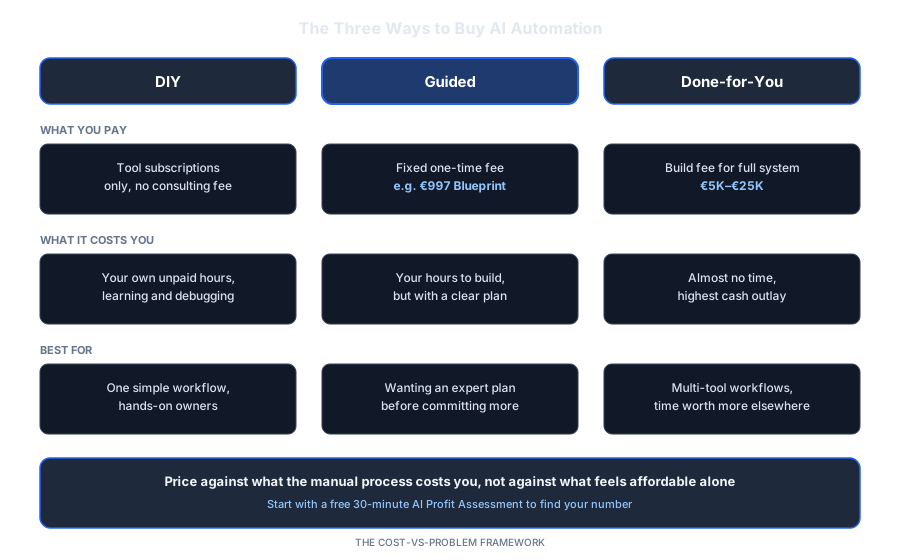
Save or share this: it's the full breakdown in one view.
Know your number before you pick a tier
DIY, Guided, or Done-for-you: the right choice depends on what your manual process actually costs you right now. In 30 minutes we find that number and the automation that pays it back fastest.
- What your current process is really costing you
- Which of the three pricing tiers fits your situation
- A realistic break-even timeline before you spend anything
30 minutes. No obligation. No pitch unless you ask for one.
Or grab the free resources first →References
- Eurostat. (2026, March 31). EU hourly labour costs ranged from €12 to €57 in 2025. ec.europa.eu
- n8n. (2026). Plans and pricing. n8n.io
- OpenAI. (2026). API pricing. developers.openai.com

About Dominik Gabor
AI Automation Consultant based in the Netherlands. Dominik helps small and mid-size businesses implement AI automation, from a single workflow to a full done-for-you system. He has spent 2+ years testing 27+ AI tools daily, and writes to give business owners honest, practical numbers instead of vague pricing.