
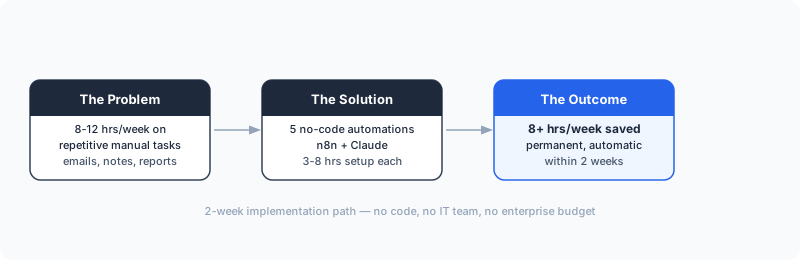
Most business owners spend 8-12 hours per week on tasks that repeat exactly the same way every time. Not complex decisions. Not creative work. The same emails, the same data entry, the same summaries written from the same template.
Dominik Gabor, an AI automation consultant based in the Netherlands, has built and tested these five automations in his own business and across projects with European SMEs. The consistent finding: each one cuts 1-3 hours per week, requires zero coding ability, and is live and running within two weeks of starting. That adds up to 8+ hours per week recovered, permanently.
None of these require a developer. None require an enterprise budget. They require a morning of configuration and a bit of patience during testing.
No-code AI automation connects your existing business tools through a visual interface, adds an AI reasoning step (usually Claude or a similar model), and runs a workflow automatically when a trigger fires. You define the logic once. The system handles execution every time, without you touching it.
Key Takeaways
- 5 automations, zero code: Lead follow-up, meeting notes, invoice reminders, weekly reports, and content repurposing, all run on n8n + Claude with no developer needed.
- 8-13 hours saved per week: Each automation recovers 1-4 hours. Stack three and the compounding effect becomes permanent capacity.
- 3-8 hours to set up each one: Most business owners complete their first working automation in an afternoon.
- GDPR-ready for Dutch and German SMEs: n8n is self-hostable, so your data never leaves your own server.
- The prompt is the product: Spend 80% of your setup time on the Claude prompt, not the workflow configuration.
Why Most Businesses Haven't Started Yet
The barrier is not complexity. The barrier is not budget.
It's that nobody has shown them where to begin.
A business owner searching for "AI automation" gets results about enterprise platforms, custom APIs, and abstract frameworks. They don't get: "Here's the exact workflow, here's the exact tool, here's how long it takes."
That's what this post is.
For Dutch and German SMEs specifically, there's an additional hesitation: GDPR compliance. The good news is that n8n, the workflow tool used in four of the five automations below, is self-hostable and widely used by European companies for exactly this reason. Your data never touches a third-party server you don't control.
The 5 No-Code AI Automations
1. Automated Lead Follow-Up Emails
What it does: When a new lead fills out your contact form or books a discovery call, Claude reads their company name, industry, and message, then writes a personalised first response in your voice. The email is drafted and sent (or queued for your approval) within minutes.
Why it matters: Research published in Harvard Business Review found that companies responding to leads within an hour are nearly 7 times more likely to qualify them than those responding even an hour later. If your team takes 4-24 hours to reply manually, you're losing deals before the conversation starts.
Tool stack: n8n + Claude + Gmail (or Outlook)
Setup time: 3-4 hours
Best for: Any B2B business receiving 5+ enquiries per week where response speed directly affects conversion.
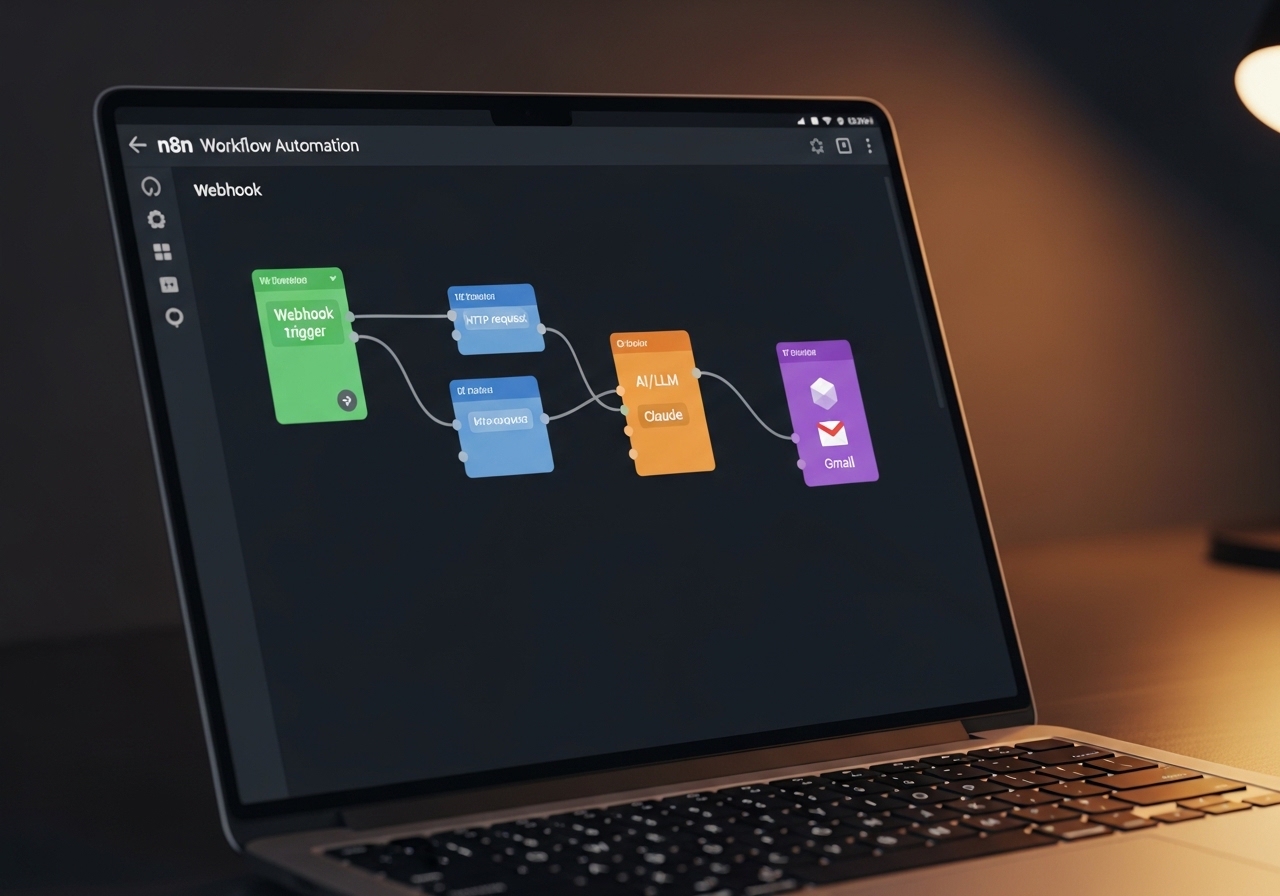
What you build: A trigger that fires on new form submission → Claude node that generates a personalised reply using the lead's details → Gmail node that sends or drafts the response.
The Claude prompt is the key step. You give it your company context, your tone, and a template structure. It fills in the specifics: the prospect's industry, their question, a relevant example from your work. The output reads like you wrote it, because it's built from your own language.
You are writing a follow-up email on behalf of [Company Name].
Tone: professional but warm, no corporate jargon.
Structure: 1 sentence acknowledging their specific question,
1-2 sentences connecting their situation to a relevant example,
1 clear next step (book a call / reply with X).

Lead details:
- Name: {{name}}
- Company: {{company}}
- Industry: {{industry}}
- Their message: {{message}}

Output only the email body. No subject line. Max 5 sentences.
Time saved: 1-2 hours per week for a business receiving 5-10 new leads.
2. Meeting Summary and Action Item Extraction
What it does: After every call or meeting, a transcript (from Fathom, Fireflies, or any transcription tool) is passed to Claude. It produces a structured summary: key decisions, open questions, and action items with owners and deadlines. The summary is posted to your Notion workspace and emailed to attendees automatically.
Why it matters: The average professional spends 20-30 minutes writing meeting notes after every call. Five meetings per week means two hours of note-taking with zero business value. That time is pure overhead, and it's entirely eliminable.
Tool stack: n8n + Claude + Notion + Gmail
Setup time: 4-6 hours
Best for: Teams with 5+ calls per week, especially client-facing roles and project managers.
What you build: A webhook trigger (your transcription tool sends the transcript here) → Claude node that extracts structured data → Notion node that creates the summary page → Gmail node that sends the recap.
Analyse this meeting transcript and output structured notes.

Required format, output exactly this structure:
## Summary (1 paragraph, max 4 sentences)
## Decisions Made (bulleted list)
## Action Items (format: "- [Owner]: [Task] by [Date]")
## Open Questions (bulleted list, unresolved items only)

Rules: Do not fabricate owners or dates.
If no date is mentioned, write "no deadline set".
Transcript: {{transcript}}
Time saved: 2-3 hours per week for a team with daily internal and client calls.
3. Invoice and Payment Reminder Sequences
What it does: When an invoice passes its due date with no payment recorded, the workflow triggers automatically. Claude writes a personalised reminder in the right tone for each stage (friendly first nudge, firmer second follow-up, formal third notice). The emails go out on schedule without anyone manually checking a spreadsheet.
Why it matters: Late payments are the single biggest cash flow challenge for SMEs with 10-50 employees. Atradius's Payment Practices Barometer consistently finds that European B2B businesses carry 30+ days of outstanding invoices on average, and most of that debt would resolve faster with systematic follow-up. The problem isn't willingness to pay. It's that manual reminders are inconsistent and get deprioritised when the team is busy.
Tool stack: n8n + Claude + Gmail + your accounting tool (Exact, Moneybird, QuickBooks)
Setup time: 4-6 hours
Best for: Any B2B business with net-30 or net-60 payment terms. Cash flow impact is immediate.
What you build: A scheduled trigger that runs daily → accounting tool node that fetches overdue invoices → Claude node that generates the right reminder text based on days overdue and client relationship → Gmail node that sends.
The Claude prompt adjusts tone based on a simple variable: days overdue. Under 7 days, the tone is light and assumes good faith. 8-21 days, firmer and specific about the outstanding amount. Over 21 days, formal and factual with payment instructions.
Time saved: 1-2 hours per week. More importantly, consistent automated follow-up typically accelerates payment, because the friction of manual chasing disappears and clients respond faster when reminders arrive on schedule.
4. Weekly Performance Report Generation
What it does: Every Monday morning, the workflow pulls key metrics from your tools (website visitors from Google Analytics, leads from your CRM, revenue from your accounting platform) and Claude writes a structured weekly summary. The report lands in your inbox (or Slack, or Notion) before you start the week.
Why it matters: Most business owners check metrics reactively, only when something feels wrong. A Monday morning report forces proactive visibility. You see trends before they become problems. Businesses running weekly data reviews make faster course corrections and accumulate better decisions over 12 months than those running on intuition alone.
Tool stack: n8n + Claude + Google Analytics + your CRM + Notion or Slack
Setup time: 5-8 hours (slightly more complex due to multiple data sources)
Best for: Data-rich businesses making reactive decisions. The biggest value is decision quality, not just time saved.
What you build: A scheduled trigger (Monday 07:00) → multiple data-fetch nodes running in parallel → Claude node that receives all data and writes a structured narrative → output node to Notion, Slack, or email.
The Claude prompt gives it a fixed structure: headline number (best metric of the week), three key observations, one concern worth watching, and one recommended action. It reads like a junior analyst wrote it, which is exactly what it is.
Time saved: 2-3 hours per week in ad-hoc metric checking and report writing. The bigger value is decision quality. You're running on data, not guesswork.
5. Content Repurposing from Long-Form to Short-Form
What it does: When you publish a blog post, record a podcast, or share a YouTube video, the workflow passes the transcript or content to Claude. It produces five LinkedIn posts, three email newsletter snippets, and a thread draft, all in your voice, all ready to review and publish.
Why it matters: Most SME owners produce one piece of long-form content and post it once. The same content could generate two weeks of short-form posts, a newsletter section, and multiple discussion threads. The work is already done. The barrier is time to repurpose.
Tool stack: n8n + Claude + Notion (content calendar) + optional LinkedIn API
Setup time: 3-5 hours
Best for: Any business producing regular content: blogs, podcasts, YouTube. Highest ROI per hour invested for content producers.
What you build: A trigger (new blog post published, or a manual webhook you fire from your phone) → Claude node that reads the content and generates repurposed versions in different formats and lengths → Notion node that stores all output in a content calendar database.
The Claude prompt is the heaviest part of the setup. You give it your voice guide: how you write, what you never say, what topics are central to your business. Once it knows your style, the output is consistent enough that reviewing it takes five minutes instead of writing from scratch.
Time saved: 3-4 hours per week for any business producing regular content.
n8n vs. Make vs. Zapier: Which One to Use
All three tools can run the automations above. The right choice depends on your priorities: data privacy, ease of use, or cost at scale.
| Tool | Best for | Self-hostable (GDPR) | Ease of use | Cost at scale |
|---|---|---|---|---|
| n8n | EU SMEs, AI-heavy workflows, data privacy | Yes, full self-hosting | Medium | Low (self-hosted = ~€20/month VPS) |
| Make | Beginners, simpler workflows, visual setup | No | Easy | Medium (€9-€16/month for most SMEs) |
| Zapier | Widest app library, simple single-step automations | No | Easiest | High (€49+/month for multi-step workflows) |
Recommendation for European SMEs: Start with n8n cloud (free tier, no server needed) to learn the pattern. Self-host once you have 3+ active workflows running. It's a 30-minute setup that drops your cost to near-zero and keeps your data on your own infrastructure. n8n's approach to GDPR and data sovereignty is documented on their blog if your legal team wants specifics.
How to Choose Which One to Start With

Don't start with the most exciting one. Start with the one where the pain is most visible right now.
Use this decision guide:
- Are you losing leads due to slow follow-up? Start with Automation 1.
- Are you drowning in meeting notes? Start with Automation 2.
- Do you have outstanding invoices that feel awkward to chase? Start with Automation 3.
- Do you make decisions without reliable weekly data? Start with Automation 4.
- Do you produce content that disappears after one post? Start with Automation 5.
Pick one. Get it running. Then add the next. The compounding effect kicks in when you have three or four running simultaneously. That's when the 8+ hours per week figure becomes real.
If you're unsure which one fits your specific setup, download the AI automation starter checklist from the free resources page. It walks through which automations make sense for different business types and team sizes.
Still not sure where to start? Book a free AI Profit Assessment. 30 minutes, and you'll leave knowing exactly which automation to build first for your specific tools and workflow.
What Makes These Work (and What Kills Them)
All five automations follow the same structural pattern: a reliable trigger, a well-constructed Claude prompt, and a clear output destination.
The part that breaks most failed automation attempts is the prompt. Business owners set up the workflow correctly, write a vague prompt ("write a summary of this meeting"), and get vague output. Then they conclude that AI automation doesn't work.
It works when the prompt is specific. Specific about the output format. Specific about the tone. Specific about what to include and what to skip. The more constraints you give Claude, the more consistent and useful the output.
Compare these two prompts for the same meeting summary use case:
Summarise this meeting transcript.Extract structured notes from this meeting transcript.
Output exactly: one paragraph summary (max 4 sentences),
bulleted decisions made, action items formatted as
"[Owner]: [Task] by [Date]", and open questions.
Do not infer owners or dates. Only use what was explicitly stated.The second prompt produces the same quality output whether Claude is having a good day or not. That predictability is what makes the automation reliable enough to trust without reviewing every output.
Two years testing 27+ AI tools in his own workflows taught Dominik one lesson above all others: the workflow is the easy part, the prompt is the product. Spend 80% of your setup time on the Claude prompt, not the n8n configuration.
For more on building a complete automation system, not just individual workflows, read the complete guide to AI automation for SMEs.
Practical Setup Steps
- Pick your first automation from the list above based on your biggest current pain.
- Create a free n8n account at n8n.io (cloud version, no server required to start).
- Connect your existing tools using n8n's built-in credential system (OAuth for Gmail, API keys for Notion, etc.).
- Build the trigger node: this is the event that starts the automation.
- Add a Claude AI node: n8n has a native Claude integration. Paste in your prompt.
- Map the output to wherever the result needs to go (email, Notion, Slack).
- Run a test with a real example from your business. Refine the prompt until the output is consistently usable.
- Activate the workflow. It runs automatically from this point forward.
Most people complete steps 1-8 for their first automation in 4-6 hours total. The second automation takes half as long because you already know the pattern.
For a deeper walkthrough of prompt construction and workflow setup, the free resources page has a prompt library and setup checklist you can use directly.
Frequently Asked Questions
What can I automate with AI in my small business without coding?
The highest-impact starting points are lead follow-up emails, meeting summaries, invoice reminders, content repurposing, and report generation. Each of these can be set up in n8n or Make without writing a single line of code. Most take 3-8 hours to configure and run unattended from day one.
Is AI automation hard to set up without coding?
Not anymore. Tools like n8n and Make use visual drag-and-drop interfaces. You connect your existing apps, define a trigger, add an AI step where Claude writes a summary or generates text, and map the output to wherever it needs to go. Most business owners set up their first working automation in an afternoon.
How long does it take to automate a business process with AI?
Simple single-step automations take 2-4 hours. Multi-step workflows that touch 3-4 tools typically take 1-2 days including testing. A full automation system covering your most repetitive processes realistically takes 2-4 weeks. The 2-week timeline in the headline applies to getting 2-3 meaningful automations live and running reliably.
What is the best no-code AI tool for SMEs in 2026?
For European SMEs, n8n is the strongest choice: self-hostable (GDPR-compliant), connects to 400+ apps, and has native AI nodes for Claude. Make is a strong alternative for beginners. Zapier has the widest app library but costs more at scale. The full comparison is in the n8n vs. Make vs. Zapier table above.
Is n8n better than Make or Zapier for small businesses?
For European SMEs that handle sensitive customer data, n8n is the better long-term choice because it can be self-hosted, meaning your data stays on your own server and never passes through a third-party cloud. Make is the better starting point if you want the fastest setup with the least friction. Zapier is best if you need a very specific app integration that only it supports.
Can I use AI automation without an IT team?
Yes. All five automations in this post require no IT involvement. You need access to your existing business tools (email, CRM, calendar) and a free or low-cost account in n8n or Make. The configuration is visual, the testing is straightforward, and the maintenance is minimal once running.
The Bottom Line
n8n + Claude is the most practical no-code AI automation stack for European SMEs in 2026. Five workflows, 19-29 hours of setup total, 8-13 hours recovered every single week after that. The only reason most SMEs haven't started yet is that nobody showed them exactly what to build and how long it takes.
The five automations in this post are proven patterns (lead responses, meeting notes, invoice follow-ups, weekly reports, and content pipelines) running in businesses right now without anyone touching them manually.
Start with one. Get it working. The second one is faster. By the time you have three running, you'll have more capacity than you've had in years, without hiring anyone.
The Complete Picture
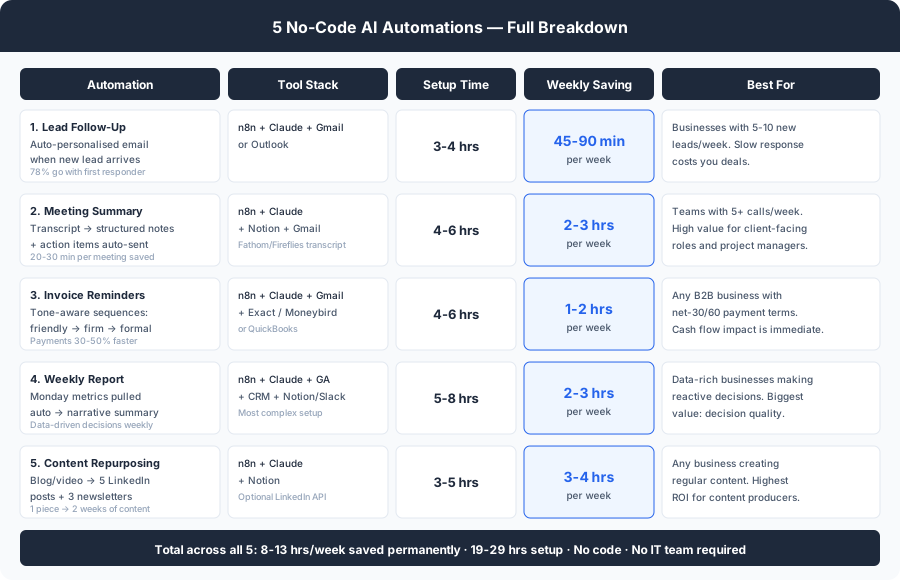
Save or share this, it's the full breakdown in one view.
Find Out Which Automation to Build First
Every business has a different bottleneck. Book a free 30-minute AI Profit Assessment and get a clear answer: which of these five automations will save you the most time this month, and exactly how to set it up for your specific tools and workflow.
Most business owners are surprised by how much of their week is automatable once we map it out together.
Book Your Free AI Profit Assessment Or start with the free AI workflow audit checklist →
About Dominik Gabor
AI Automation Consultant based in the Netherlands. Dominik helps small and mid-size businesses implement AI automation, from lead response workflows to weekly reporting systems. He has spent 2+ years testing 27+ AI tools daily, and writes to give business owners the exact, practical starting points that most AI content skips over.