
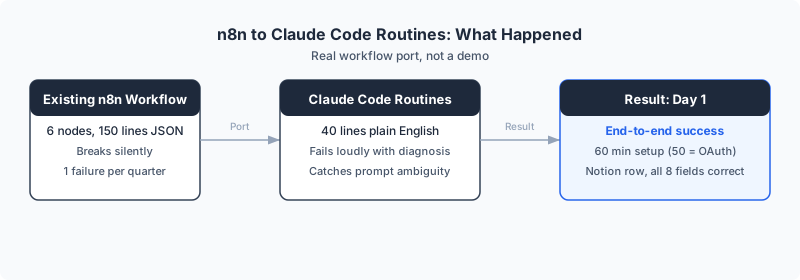
Building an n8n workflow takes 150 lines of JSON and some technical skill. Building a Claude Code Routines workflow takes 40 lines of plain English. That is the shift that happened on April 14, 2026, and it changes who can automate their business.
I tested this claim by porting a live n8n workflow to Routines within 72 hours of launch. The first run failed cleanly. The second run succeeded end to end. Total setup: about 60 minutes, and 50 of those were spent fixing an expired OAuth token that had nothing to do with Routines itself. The actual prompt writing took 10 minutes, mostly because I was using voice dictation instead of typing.
This post is for a specific reader: you run a small or mid-sized business, you have heard that automation can save you hours per week, but you have never built a workflow because the tools felt too technical. Dominik Gabor, an AI automation consultant based in the Netherlands, has built workflows for European SMEs across 27 tools over the past two years. This is a practitioner review of whether Routines actually lowers the bar.
Claude Code Routines is a feature Anthropic launched on April 14, 2026 that lets a Claude Code session run on a schedule, via API call, or on a GitHub event. You define the work as a prompt in plain English, attach a GitHub repo, and connect services like Notion or Slack. Claude runs the workflow on Anthropic cloud infrastructure and reports the result.
Why this changes who can automate
Before Routines, automating a business process meant learning a tool. n8n requires you to understand nodes, data flow, JSON expressions, and API authentication. Make and Zapier are simpler, but still require mapping fields, handling errors in a visual editor, and understanding how data moves between steps.
Routines replaces all of that with a prompt. You write in English what you want to happen, and Claude figures out how to execute it. If your instruction is ambiguous, it flags the ambiguity instead of silently doing the wrong thing. If something breaks, it tells you what went wrong in language you can read without Googling a stack trace.
This is not "no-code" in the way Zapier is no-code. Zapier gives you boxes to fill in. Routines gives you a blank page and says "describe what you want." That distinction matters. The blank page is simultaneously easier for people who think in words and harder for people who think in diagrams.
You do not need to be technical to use this
Here is the full mental model. You need three things.
A written instruction in plain English. Not code. Not JSON. Not a flow diagram. Just a clear description of what you want done, when, and where to put the result.
A GitHub repository that Claude clones on each run. This can be a private repo containing your brand voice, your pricing, your templates, or any reference material Claude should use when running the workflow. You do not need to write code in this repo. It is a folder of documents.
Optional connectors for services like Notion, Slack, Linear, and Drive. You toggle these on in the Routines settings. No API key management required for supported connectors.
The triggers are a schedule (minimum one hour interval), an HTTP call with a bearer token, or a GitHub event like a pull request. Runs happen on Anthropic's infrastructure, which means your laptop can be closed. Each run creates a full session you can review later.
What the actual prompt looks like
This is the most common question I get: "What does 40 lines of plain English actually look like?" Here is a simplified version of the prompt I used, with credentials removed:
# Weekly SEO Report

Every Monday at 9:00 AM CET:

1. Calculate the date range for the most recently completed
   Monday-through-Sunday week.

2. Authenticate with Google Search Console using the
   credentials in this repo's .env file.

3. Pull search performance data for dominikgabor.com
   for that date range. Include: impressions, clicks,
   CTR, average position, and top 5 queries by clicks.

4. Format the result into these Notion database fields:
   - Week (e.g. "W15 2026")
   - Date Range (e.g. "2026-04-07 to 2026-04-13")
   - Impressions
   - Clicks
   - CTR
   - Average Position
   - Top Queries (comma-separated)
   - Notes (any anomalies or significant changes)

5. Write a new row to Notion database [database-id].

6. If any step fails, stop and report the error.
   Do not write partial data to Notion.
That is it. No JSON. No node configuration. No data mapping. If you can describe what a virtual assistant should do in an email, you can write a Claude Code Routines prompt.
The real test: porting an n8n workflow
My source workflow was six nodes in n8n. A Monday 9am trigger, two Google Search Console API calls, a date formatter, and a Notion write. Total build time in n8n originally: about 30 minutes. Monthly cost: zero, self-hosted. Failure rate: roughly one silent failure per quarter, usually from expired credentials.
I rebuilt it as a single Routines prompt. No nodes, no JSON, no data mapping. Just English instructions pointing at my brand kit repo with one Notion connector enabled.
What happened on the first run
It failed. Not gracefully silent like a bad n8n workflow. Loudly, with a clean explanation.

Claude attempted to exchange my Google refresh token for an access token, hit an invalid_grant error from Google, stopped, wrote a four-point diagnosis of the root cause, listed the likely reasons (revoked token, 7-day expiry in Testing mode, scope mismatch, client ID mismatch), and recommended the exact fix. No fake data, no retry loop, no silent row dropped in Notion.
I have worked with n8n error logs for two years. This was categorically better. n8n tells you "Node execution failed: OAuth2 error." Claude told me, in English, what Google was rejecting and why, and what to change.
The fix took 50 minutes, but the pain was not Claude's fault. My Google Cloud project had a stale refresh token from months earlier. This is a general OAuth problem that hits every automation tool, not a Routines limitation. n8n's one-click reconnect button is one of its best features, and Routines does not yet have an equivalent.
If you want to see which of your current workflows would survive this exact test, book your Free AI Profit Assessment and I will map out the three highest-ROI automations in your business.
The beginner advantage
Here is what surprised me most: a beginner would have had fewer problems than I did.
My OAuth token was stale because I had set it up months ago for a different tool. A fresh setup, with no legacy credentials to conflict with, takes about 15 minutes. My prompt had a date ambiguity because I was thinking in n8n's date-function logic. A beginner who simply wrote "pull data from last week" would have given Claude a cleaner instruction.
The baggage of knowing how automation tools work actually created friction. The person who has never opened n8n would write a cleaner prompt because they would describe what they want, not how to do it. Routines is built for intent, not implementation.
Want help figuring out which processes to automate first? Book a free 30-minute workflow audit. I will identify the three workflows with the highest ROI in your business and help you write the first prompt.
What happened on the second run

End-to-end success. The Notion row appeared with all eight fields filled in correctly. The data matched Google Search Console exactly.
One detail surprised me. The prompt I wrote said "calculate last Monday (7 days ago) through last Sunday (yesterday)." I wrote that on a Thursday. "Yesterday" was not Sunday, so the instruction was contradictory. Claude flagged the ambiguity in its own output, made the correct interpretation (canonical Monday-to-Sunday completed week), and said so explicitly.
n8n would have silently used whatever date expression I put in the node, correct or not.
This is the kind of difference that changes where value lives. In n8n, you are responsible for catching your own mistakes in a JavaScript expression box. In Claude Code Routines, the system reads your intent. In practice, it means fewer silent bad rows in your database over a year of weekly runs. And it means someone who has never written a JavaScript date function can still get the right result.
Capability scorecard: n8n versus Claude Code Routines
For the specific workflow I ported, here is the honest comparison.
| Capability | n8n | Claude Code Routines | Winner |
|---|---|---|---|
| Scheduled trigger | Yes | Yes (1hr minimum) | Tie |
| Manual run | Yes | Yes | Tie |
| Visual flow editor | Yes | No | n8n |
| OAuth reconnect UX | One click | Manual env vars | n8n |
| MCP connectors (Notion, Slack) | Partial | Native | Routines |
| Error diagnosis quality | Stack trace | Root cause in English | Routines |
| Date reasoning on fuzzy input | Silent | Flags ambiguity | Routines |
| Self-hosting | Yes | No | n8n |
| Beginner accessibility | Medium | High | Routines |
The scorecard splits roughly even on features. Where Claude Code Routines pulls ahead is on the dimension that matters most for beginners: you can use it without learning a tool. You just write what you want.
Pricing math for a European SME
Routines is bundled into Claude Code subscriptions. Daily run caps as of April 2026: Pro 5 runs per day, Max 15, Team or Enterprise 25. Token use per run counts against your normal Claude Code quota.
A small business running a weekly SEO report and a daily inbox triage uses 8 runs per week. That fits Pro at around 20 euro per month. For comparison, a self-hosted n8n instance on a 5 euro Hetzner VPS costs 5 euro per month plus your time to maintain it.
The honest cost picture for Dutch and German SMEs: if you already pay an automation consultant 100 euro per hour for n8n maintenance, replacing one maintenance hour per month with Routines pays for a Pro plan five times over. If you do everything yourself and your workflows are simple, self-hosted n8n remains cheaper. The break-even is labor, not software.
Across the Netherlands and Germany, the SMEs most likely to benefit from Claude Code Routines are teams with 5 to 20 people, where ops bandwidth is the bottleneck and paying someone to babysit workflows is a real line item. But there is a new category now: the solo founder who never automated anything because n8n felt too technical. For that person, Routines at 20 euro per month is not competing with n8n. It is competing with doing things manually.
What Claude Code Routines is not good for, yet
Three categories I would not port to Routines in April 2026.
High-volume data plumbing. If you sync 10,000 rows from a database to a warehouse every hour, n8n or a purpose-built ETL tool is the right answer. Routines is overkill and expensive at that scale.
Visual debugging with non-technical teammates. If your operations lead needs to look at a workflow and understand what each step does without reading a prompt, n8n's flow editor wins. Routines is a text file, which is great for people who think in words and confusing for a COO who just wants to see the boxes and arrows.
Anything that cannot tolerate a one-hour minimum schedule interval. If you need a workflow to fire every 10 minutes, Routines is not built for that today.
What this means if you have never automated anything
The barrier to "I should automate this" just dropped by an order of magnitude. Building an n8n workflow used to require a consultant or a technical cofounder. Building a Routines workflow requires the ability to describe your process in English.
That means the bottleneck is no longer implementation. It is opportunity identification. Knowing what to automate in your business is now the valuable skill. Knowing how to wire n8n nodes is becoming commodity.
For small European businesses, the first practical move is simple: write down three workflows you wish existed but have never bothered to build because the tools felt too hard. That list is now cheaper to act on than it was two weeks ago.
Practical next steps if you run a small business
- Write down three processes you do manually every week that follow a repeatable pattern.
- For each one, write a plain English description of what should happen, when, and where the output should go. Keep it under 50 lines.
- Sign up for Claude Code Pro (around 20 euro per month). Create one Routine using your best prompt.
- Run it manually first. Check the output. Fix the prompt if needed. Claude will tell you what went wrong in plain English.
- Set a schedule. Watch it run unattended for two weeks.
- If you already use n8n or Make, do not switch everything. Keep the pure data-plumbing workflows on n8n. Move the reasoning workflows (classification, summarization, formatting, decisions) to Routines.
- Move any Google OAuth project out of Testing mode and into Production to avoid the 7-day token expiry.
Frequently Asked Questions
Do I need to know how to code to use Claude Code Routines?
No. Claude Code Routines runs from a plain English prompt. You describe what you want to happen, connect a GitHub repo with your reference material, and attach services like Notion or Slack. Claude handles the technical execution. If you can write an email explaining what you want a virtual assistant to do, you can write a Routines prompt.
What is Claude Code Routines?
Claude Code Routines is a feature Anthropic launched on April 14, 2026 that lets a Claude Code session run on a schedule, by API call, or on a GitHub event. You define the work as a prompt, attach a GitHub repository, and connect services like Notion or Slack. Claude runs the workflow on Anthropic cloud infrastructure and reports the result. It is in research preview on Pro, Max, Team, and Enterprise plans.
Is Claude Code Routines better than n8n for small businesses?
For workflows that need reasoning, classification, or adaptive output, yes. Claude Code Routines handles fuzzy logic and date reasoning better than any node-based tool. n8n stays better for high-volume data plumbing, visual debugging with non-technical teammates, and deep OAuth integrations. Most SMEs will end up using both tools for different types of work.
How much does Claude Code Routines cost?
Routines is bundled into existing Claude Code subscriptions. Daily run caps as of April 2026 are 5 runs on Pro, 15 on Max, 25 on Team or Enterprise. A small business running a weekly report and a daily inbox triage fits comfortably inside the Pro plan at around 20 euro per month.
What can go wrong with Claude Code Routines?
The most common failure on day one is OAuth. Any external service that needs a long-lived refresh token requires careful setup. If you set it up in Google Cloud Testing mode, your token expires every seven days and the routine breaks silently. Move OAuth projects to Production mode before you trust a weekly schedule.
The Bottom Line
Claude Code Routines is the first automation tool that genuinely does not require technical skill. It replaces a specific slice of n8n workflows today, handles errors better than any automation tool I have used in two years, and opens automation to business owners who never had access before. It does not replace n8n for everything, and it is days old in production, so start small and validate before scaling.
Claude flagged a bug in my own prompt and made the right call anyway. That single behavior tells you more about where this is going than any feature list. A beginner who writes "pull last week's data and put it in Notion" would have given Claude a cleaner instruction than I did with my n8n-trained thinking.
The skills that made automation consultants valuable over the last seven years just became easier to access. But the skill that replaces them, knowing which process in a business is worth automating at all, is harder to commoditize. That is where the real value now sits.
If you want to see which of your processes could become a Routine, book a free 30-minute workflow audit. I will help you write the first prompt and identify the three workflows with the highest ROI. If you want the full comparison on the broader tool question, read my Claude Code vs n8n honest verdict.
This is a day-3 review based on a real workflow port. I will update this post after 30 days of production use with reliability data, failure rates, and any new limitations discovered. Check back in May 2026 for the update.
The Complete Picture
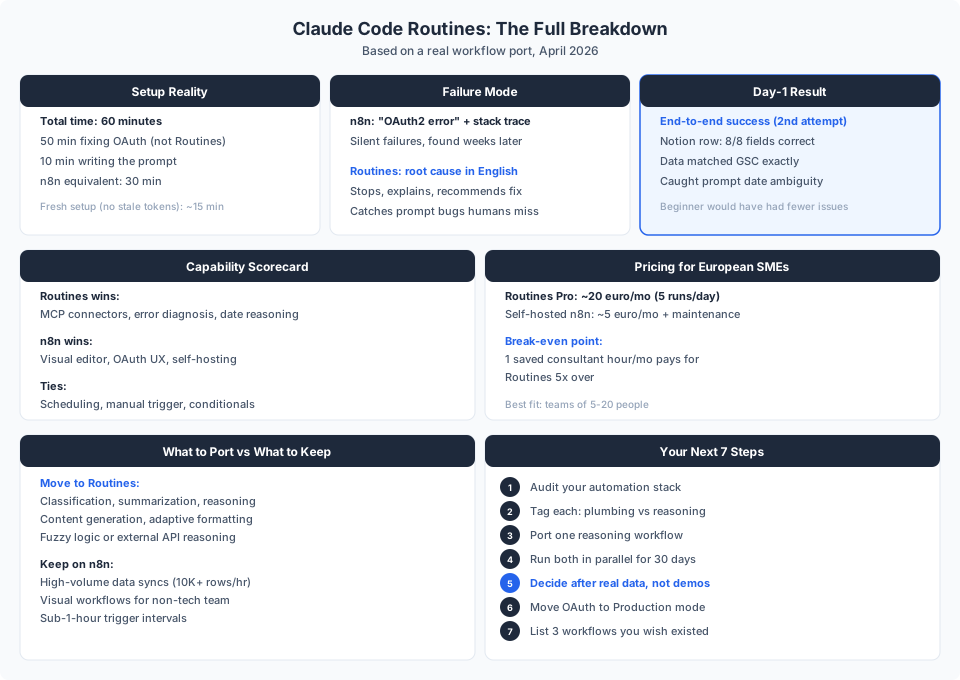
Save or share this. It is the full breakdown in one view.
Get the Full Prompt Pack (Free)
The exact prompt from this post, plus two bonus templates you can copy and paste into Claude Code Routines today:
- Weekly SEO Report (the one from this post, ready to use)
- Daily Inbox Triage (classify, prioritize, and summarize overnight emails)
- Weekly Team Summary (pull project updates from Notion and format a status report)
Want Help Identifying What to Automate?
The prompts above handle the "how." The harder question is "what." Book a free 30-minute workflow audit and I will identify the three manual processes in your business with the highest automation ROI. We will write the first Routine prompt together.
Most business owners discover 2 to 3 automatable processes in the first session.
Book Your Free AI Profit AssessmentShare This Article
If this was useful, share it with a business owner who is still running everything manually.

About Dominik Gabor
AI Automation Consultant at TwinScale AI in Leeuwarden, the Netherlands. Dominik helps small and mid-size businesses implement AI Operating Systems, from lead response automation to strategic daily briefings. He tests 27+ AI tools daily.