
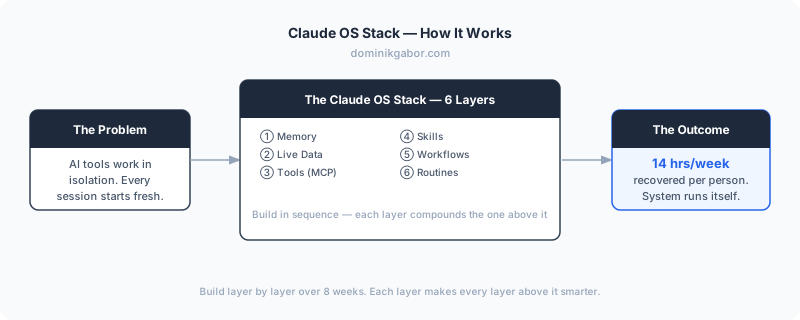
Most business owners use AI the same way they used to use Google: one question at a time, then close the tab.
That works. It just doesn't compound. Every session starts from zero. Claude has no idea who you are, what tools you use, or what you did yesterday. You get a smart answer to a narrow question, then you're back to doing the work yourself.
Dominik Gabor, an AI automation consultant based in the Netherlands, has spent two years building a different approach: one where Claude doesn't just answer questions but runs tasks, monitors live data, and executes recurring workflows automatically. The result is what he calls the Claude OS Stack: a six-layer build sequence that turns Claude from a chatbot into a self-running business operating system.
The core insight: 95% of businesses using AI are still at layer one. Building all six layers is what separates the businesses that get 10x productivity gains from the ones that got a fancier search engine.
The Claude OS Stack is a six-layer architecture for building a Claude-native business operating system. Each layer adds a new capability: persistent memory, live data access, connected tools, reusable skills, cross-tool workflows, and finally scheduled routines that run automatically without human input. Built in sequence, the layers compound: each one makes every layer above it smarter and more capable.
Why Most AI Setups Stay Broken
Here's the problem with how most people set up AI: they add tools randomly.
ChatGPT for writing. Claude for analysis. Zapier for a few automations. Maybe a virtual assistant for the rest. Nothing talks to anything else. Every tool starts each session with zero context about your business, your clients, or your priorities.
The result feels like hiring a brilliant new employee every single morning, then having them quit every evening, taking everything they learned with them.
The Claude OS Stack fixes this by building layers in a specific order. Skip a layer and the one above it breaks. Build them in sequence and the system compounds.
For Dutch and European SMEs specifically, this matters more than ever. The gap between businesses that have systematized AI and those still prompting randomly is widening fast. The window to build a meaningful advantage is open, but not indefinitely.
Layer 1: Memory: Give Claude a Permanent Brain
The first layer is the most underrated. Without it, nothing else sticks.
Claude's memory system lives in two places. The first is CLAUDE.md, a plain text file where you write everything Claude should always know: who you are, what your business does, your offer stack, your communication rules, your active projects. Think of it as the employee onboarding document that never goes out of date. (Claude Code's official memory documentation explains the full architecture if you want to go deeper.)
The second is auto-memory: as you work with Claude, it saves learnings automatically to a structured memory folder. Preferences, decisions, project context, feedback on its own mistakes. The first 200 lines load at the start of every session.
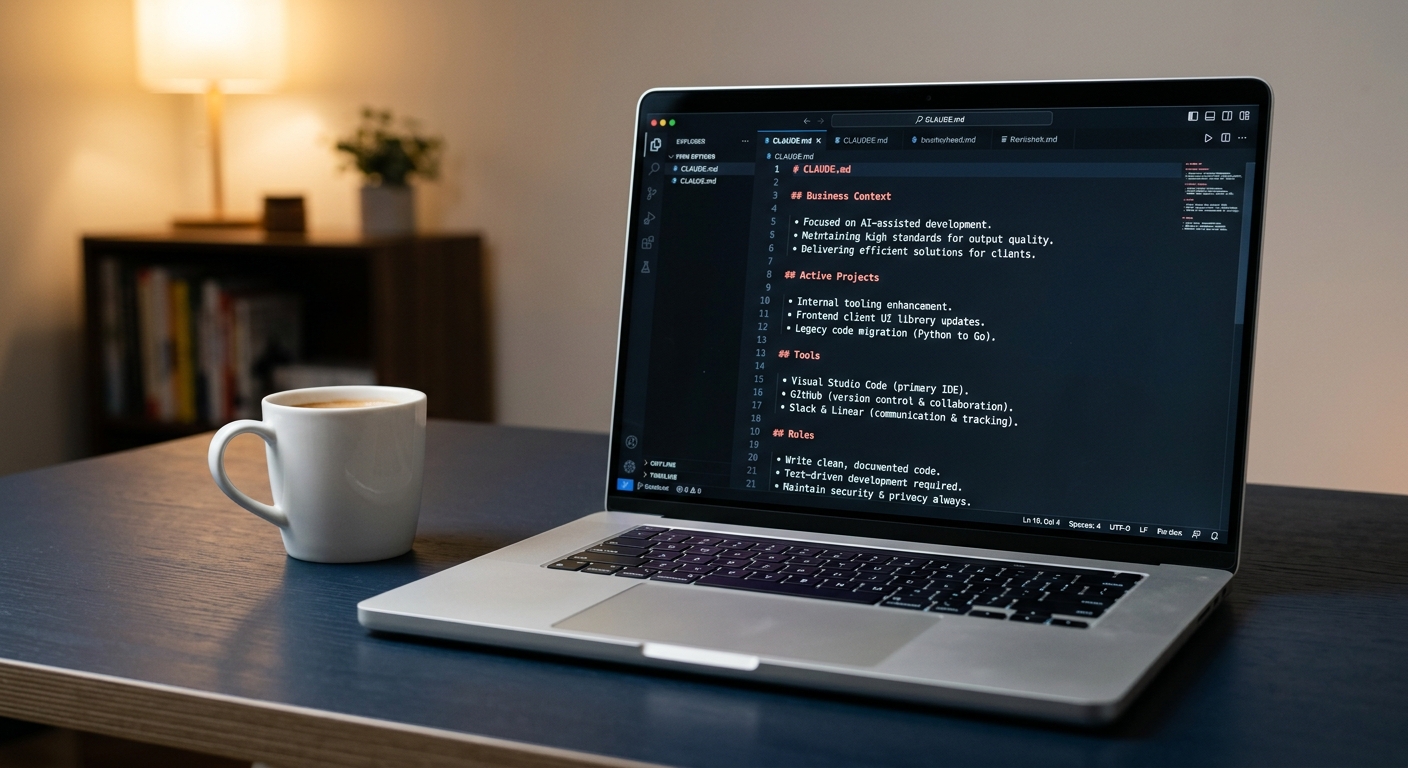
What this looks like in practice: Instead of explaining your business every session, Claude opens knowing you run an AI consulting firm in the Netherlands, your highest-ticket service is a €15K AI Operating System implementation, your current priority is closing a manufacturing client in Germany, and you have a strict rule about never using em dashes in copy.
Time to set up: 2–3 hours to write a solid CLAUDE.md. Pays back in the first week.
Layer 2: Live Data: Connect Claude to What's Actually Happening
Memory gives Claude context about who you are. Live data gives it context about what's happening right now.
This is where most setups stop being theoretical and start being genuinely useful.
Live data sources you can connect Claude to directly:
- Google Search Console: Claude can pull your weekly ranking movements, spot pages that dropped, flag keywords gaining traction, and surface quick-win opportunities before you even open a dashboard
- YouTube Analytics: view counts, watch time, traffic sources, top-performing videos by engagement rate
- Google Sheets / Airtable: any structured data your business tracks: lead lists, revenue numbers, project statuses, client health scores
How the connection works: Each of these connects through MCP: the same protocol used in Layer 3. GSC, YouTube, and Google Sheets each have a Claude-compatible MCP server. You install it once (typically 20–30 minutes following a setup guide), authenticate your account, and from that point Claude can read from those sources directly in any session or routine. No middleware, no Zapier bridge, no manual export. The data comes to Claude; you don't go fetch it.
The key distinction from Layer 3 is directionality: live data connections are primarily read: Claude monitors and reports. Layer 3 tools are read-write: Claude takes action.
What this looks like in practice: Every Monday morning, before you touch your laptop, Claude has already read your GSC data, identified the three blog posts that dropped in position last week, and drafted a short report with recommended actions. I use this exact routine every Monday: it replaces 45 minutes of manual dashboard review.
That's not automation. That's leverage.
Layer 3: Tools: Give Claude Hands
Memory is what Claude knows. Live data is what Claude sees. Tools are what Claude can do.
This layer uses MCP: Model Context Protocol: a standard that lets Claude connect directly to the software your business already runs. It's a one-time setup per tool, typically 20–30 minutes, and after that Claude can read and write to those tools natively.
Tools worth connecting for most SMEs:
| Tool | What Claude can do with it |
|---|---|
| Apollo | Search leads, enrich contact data, add people to sequences |
| Notion | Create, update, and query your project and CRM database |
| Google Workspace | Read and send emails, create calendar events, update docs |
| n8n / Make | Trigger existing automation workflows on demand |
| Airtable | Read and write structured records across any base |
The non-technical reality: MCP setup doesn't require coding. Each connector has a setup guide. The harder part is deciding which tools to connect first. Start with the ones you touch every single day: email, your CRM, and your data source. Add more as the system matures.
What this looks like in practice: You tell Claude "find the 10 Dutch manufacturing CEOs in Apollo we haven't contacted yet and add them to the Q2 outreach sequence." Claude does it. You didn't open Apollo.
Layer 4: Skills: Build Reusable Task Recipes
Now the system starts to get interesting.
Skills are saved task templates: plain English instructions stored in a folder that Claude can execute on command. They encode the "how" of your recurring work so you never have to explain it twice.
Each skill is a markdown file with a name, a trigger description, and step-by-step instructions. When Claude sees a trigger phrase that matches a skill description, it runs the skill automatically.
Examples from a real business:
/linkedin-daily: pulls today's 10 LinkedIn leads, opens Safari (not Chrome, because you're logged in on Safari), personalizes connection notes based on profile data, logs sends to your CRM/seo-blog-writer: validates keyword opportunity, confirms the plan with you, writes a full SEO-optimized draft, logs it to Notion/inbox-triage: reads your unread emails, categorizes by urgency, drafts replies for the routine ones, flags anything that needs your personal attention
The skill-building rule: Don't build a skill until you've done the task manually at least three times. On the third repetition, you know exactly what the instructions should say.
What this looks like in practice: You type "linkedin batch" and Claude executes the full 10-step LinkedIn outreach sequence (including opening the right browser) without you issuing a single additional instruction.
Layer 5: Workflows: Connect Skills Across Tools
Individual skills are powerful. Connected skills are a different category entirely.
A workflow is a skill that calls other skills or crosses tool boundaries. It takes an input from one tool, processes it with Claude's intelligence, and writes an output to a different tool (all in a single command).
Real example: the blog-to-distribution workflow.
/seo-blog-writerwrites the draft and logs it to Notion/blog-formatterconverts the draft to production HTML/blog-deploypublishes to Vercel and submits the URL to Google Search Console/blog-to-linkedingenerates a LinkedIn post from the published article/blog-to-instagramgenerates carousel slides from the same content
Five skills. One piece of content. Five platforms. Triggered in sequence with a single command.
Content businesses aren't the only ones who benefit from this. A sales team workflow looks equally clean:
/lead-researchpulls company data from Apollo and enriches the contact profile/lead-scoreruns the prospect through your ICP criteria and assigns a score/outreach-draftwrites a personalized first-touch message based on the enriched profile/crm-logpushes the scored lead and draft to Notion with status "Ready to Review"
Four skills. One new lead. No manual work between research and outreach draft.
Why this matters for European SMEs: Workflow chaining is where the time savings compound. A single-skill execution saves minutes. A four-skill chain triggered by one command saves an hour. Built once, it runs every time, whether you're running a content pipeline, a sales motion, or a weekly operations review.
If you want to see which of your current workflows are candidates for this kind of skill-chaining, book your Free AI Profit Assessment (takes 30 minutes).
Layer 6: Routines: Let the System Run Itself
This is the layer that changes everything.
Claude Routines are scheduled tasks that run on Anthropic's cloud infrastructure. You configure the prompt, connect the tools, set a schedule, and Claude executes automatically, even when your laptop is closed, even when you're on holiday, even at 6am before you wake up.
Current limits, verified May 2026 (source: Claude plans):
- Pro plan: 5 routine runs per day
- Max plan: 15 routine runs per day
- Team / Enterprise: 25 routine runs per day
- Minimum interval between runs: 1 hour
For most SMEs, 5–15 daily automated tasks is more than enough. Here's what a real routine stack looks like:
| Routine | Schedule | What it does |
|---|---|---|
| Inbox triage | 07:00 daily | Reads email, categorizes, drafts replies for routine messages |
| GSC monitor | 08:00 daily | Pulls ranking changes, flags drops, saves report to Notion |
| LinkedIn batch | 09:00 weekdays | Executes the day's connection outreach sequence |
| Lead enrichment | 10:00 daily | Pulls new Apollo leads, enriches with company data, adds to CRM |
| Content pipeline | 14:00 weekdays | Checks Notion for posts in "Formatted" status, queues for review |
| EOD summary | 17:30 weekdays | Reads the day's activity log, drafts a summary to Slack |
That's six routines. Runs every weekday. Zero manual input.
The honest limitations (because you deserve to know):
Routines are not right for everything. They're scheduled, not reactive. If you need Claude to respond the moment a lead fills in a form, a routine won't do it, because the minimum trigger interval is 1 hour. For real-time event-driven automation, tools like n8n or Make are still the right answer.
Think of it this way: routines handle the recurring, predictable work that drains your team's time every single day. Real-time triggers handle the event-driven work that needs an instant response. The two complement each other rather than compete.
How to Build Your Claude OS Stack: The Sequence
Don't try to build all six layers at once. This is the order that works:
- Week 1: Memory: Write your
CLAUDE.md. Include: who you are, your offer stack, your active projects, your communication rules, your tools. Spend 2 hours. Do it properly. - Week 2: Live data: Connect your single most important data source. For most consultants, that's Google Search Console or your CRM. One connection only.
- Week 3: Tools: Set up MCP for your top two tools. Email and Notion are the standard starting point.
- Weeks 4–6: Skills: Build one skill per week for your three most repeated tasks. Test each one manually five times before moving on.
- Week 7: Workflows: Chain two existing skills together. The blog-to-linkedin chain is a good first workflow.
- Week 8: Routines: Promote your most reliable skill to a routine. Start with inbox triage or the daily data report.
By week eight, you have a working Claude OS. Not a perfect one, but a real one, running real tasks, saving real hours.
Not sure which layer to start with for your specific business? A Free AI Profit Assessment maps your existing setup against all six layers in 30 minutes.
What a Real SME Stack Looks Like After 90 Days
After three months of building layer by layer, here's what becomes possible for a typical 10-person consultancy. Across the Netherlands and Germany, this is the pattern I'm seeing consistently in professional services businesses that have built all six layers:
- 4 hours/week saved on email triage and drafting (automated to Layer 6)
- 3 hours/week saved on lead research and CRM logging (automated via Apollo MCP + routines)
- 5 hours/week saved on content distribution (automated via skill-chaining, Layers 4–5)
- 2 hours/week saved on reporting and analytics (Layer 2 + Layer 6)
That's 14 hours per week. Per person. Without hiring. Without rebuilding your processes. Built incrementally, one layer at a time.
To understand what this means for the AI agents that sit inside the stack, read the full breakdown: AI agents for business: 2026 implementation guide.
Frequently Asked Questions
What are Claude Code routines?
Claude Routines are scheduled automation tasks that run on Anthropic's cloud infrastructure, even when your laptop is closed. You configure a prompt, connect your tools, set a schedule, and Claude executes the task automatically. Pro plan gets 5 runs/day, Max plan gets 15, with a minimum 1-hour gap between runs.
Can non-developers use Claude Code for business automation?
Yes. The Claude OS Stack is designed for business owners, not developers. The memory and skills layers require no coding at all (just writing instructions in plain English). The tools layer (MCP) requires a one-time setup that takes about 30 minutes, usually by following a step-by-step guide or having a consultant do it once.
What's the difference between Claude skills and Claude routines?
Skills are reusable task templates you trigger manually (think of them as saved recipes). Routines are those same tasks running automatically on a schedule without you touching anything. You build skills first, then promote the best ones to routines once they're working reliably.
How many Claude routines can I run per day?
Pro plan: 5 routine runs per day. Max plan: 15 routine runs per day. Team and Enterprise plans get 25. The minimum interval between any two runs is 1 hour. For most SMEs, 5–15 automated daily tasks covers inbox triage, daily reporting, lead logging, and content scheduling, leaving room to spare.
What's the difference between the Claude OS Stack and tools like Zapier or n8n?
Zapier and n8n are trigger-based (if X happens, do Y). They're excellent for real-time automations, like a form submission instantly triggering an email. The Claude OS Stack is intelligence-based: Claude reads context, makes decisions, and executes tasks that require judgment. The two approaches complement each other rather than compete.
The Bottom Line
The Claude OS Stack is the most practical framework for SME owners who want AI to actually run parts of their business, not just assist with individual tasks. Built layer by layer over eight weeks, it delivers 10–15 hours per week in recovered capacity for a typical 10-person SME (no technical hire needed, no enterprise budget, no rebuilding how your business works).
Most businesses will spend 2026 adding AI tools randomly and wondering why they're not seeing results. The ones that build in layers (memory first, then live data, then tools, then skills, then workflows, then routines) will have a system that gets smarter every week.
The gap between those two groups is going to be wide. Start at Layer 1 this week.
The Complete Picture
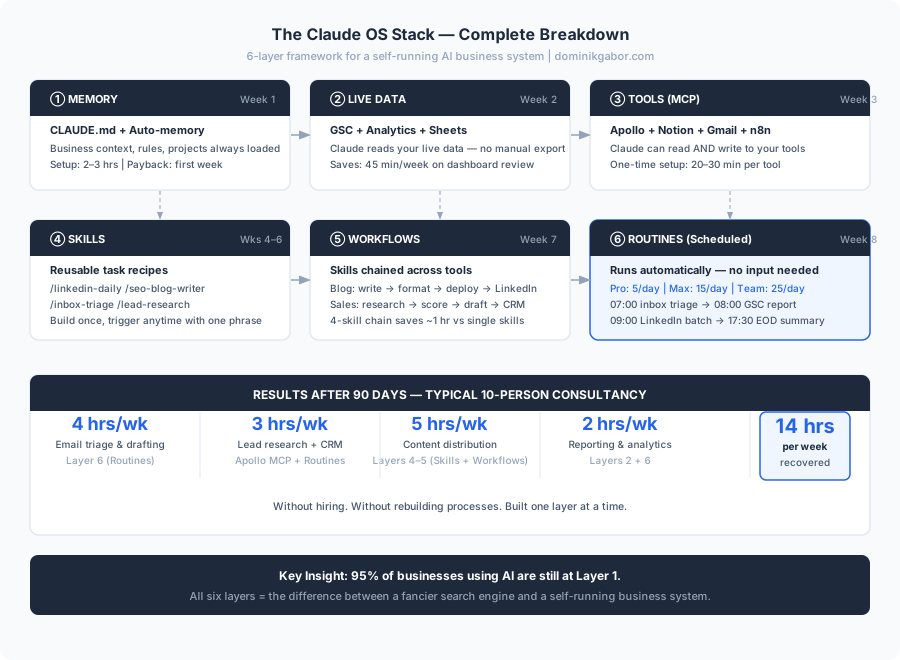
Save or share this: it's the full breakdown in one view.
Ready to Map Your 6 Layers?
A Free AI Profit Assessment takes 30 minutes. You'll leave knowing exactly which of your six layers are already built, where the gap is costing you the most, and which layer to build first. No pitch, no obligation, just a clear action plan.
Most business owners are surprised to find they've already started Layers 1–2 without realizing it. We just help you finish the sequence.
Book Your Free AI Profit Assessment Or download the free prompt templates to write your own CLAUDE.md →Share This Article
If this was useful, share it with a business owner who's still running everything manually.

About Dominik Gabor
AI Automation Consultant at TwinScale AI in Leeuwarden, the Netherlands. Dominik helps small and mid-size businesses implement AI Operating Systems, from lead response automation to strategic daily briefings. He tests 27+ AI tools daily.