
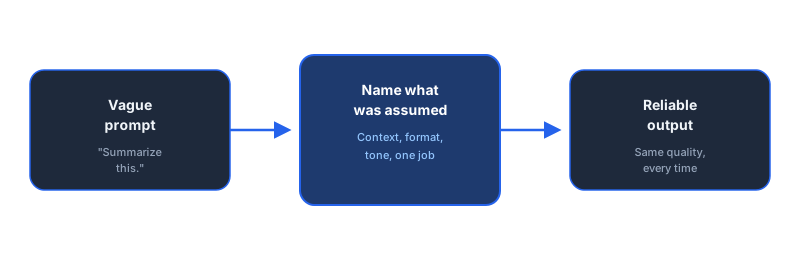
Read enough prompts written by business owners trying to get AI to do real work, and the pattern repeats with almost no variation: the tool gets blamed for a problem the prompt caused. "AI just isn't reliable enough for this" is usually a translation of "my prompt didn't say what I actually needed."
That distinction matters because it changes what needs fixing. A tool problem needs a different tool. A prompt problem needs ten minutes and a rewrite. This post covers the ten mistakes that show up most often in business prompts, in customer support drafts, internal reports, custom GPT instructions, and automated workflows, and exactly what to do instead of each one.
A prompt engineering mistake is any instruction that leaves the AI to guess something you actually had an answer for: the tone you wanted, the format you needed, the context that made the request specific instead of generic. The AI isn't wrong to guess. It's doing exactly what an underspecified instruction asks for. The fix is always the same shape: say the part you were assuming was obvious.
Key Takeaways
- Vague prompts produce vague, inconsistent output, which is what actually erodes a team's trust in AI tools, not the tools themselves.
- Every mistake below has the same fix shape: say the thing you assumed was obvious, whether that's context, format, or tone.
- One prompt per model isn't paranoia, it's a five-minute test that prevents a workflow from silently degrading when you switch tools.
- Prompts are never "done": the first version is a draft to test against real inputs, not a final answer.
- A shared prompt library beats a prompting course for getting an entire team to actually use AI well.
Why One Mistake Quietly Repeats Itself All Week
A bad prompt rarely fails once and gets noticed. It fails quietly, every single time it's used, in a slightly different way that looks like the AI "being inconsistent" rather than the prompt being underspecified.
That's the real cost. Not one bad output, but a small tax paid every time the workflow runs: a few minutes rewriting the output, a follow-up message to clarify, a colleague deciding to just do it manually next time. Multiply that by however many times a week the prompt runs, and a five-minute fix that never gets made becomes hours of quiet drag.
Two years of testing across 27+ AI tools point to the same conclusion every time: the workflow is the easy part, the prompt is the product. Most of the mistakes below take less time to fix than it took to notice them.
The 10 Prompt Engineering Mistakes

1. Being Too Vague
What people do: "Summarize this document." "Write something about our new feature." No length, no audience, no angle.
What to do instead: Name the output directly. "Summarize this document in 3 bullet points, each under 15 words, for a founder who has 30 seconds." The AI stops guessing the moment you stop leaving room to guess.
2. Skipping Business Context
What people do: Ask a general question and expect a specific answer. The AI doesn't know your industry, your customers, or your voice unless told.
What to do instead: Open with two or three sentences of context every time: what the business does, who the reader is, what "good" looks like here. It feels repetitive. It's the single highest-leverage line in the prompt.
3. Cramming Too Many Tasks Into One Prompt
What people do: "Summarize this, then write a reply, then suggest three follow-up questions, then translate it." Each additional task pulls attention away from the ones before it.
What to do instead: One job per prompt where possible. If the workflow genuinely needs four steps, that's a prompt chain (mistake 8), not four instructions stacked into one message.
4. Not Specifying the Output Format
What people do: Leave format unstated and get a different structure every time, sometimes a paragraph, sometimes a list, sometimes both.
What to do instead: State the exact structure: "Output exactly: one summary paragraph, a bulleted list of decisions, and a table of action items with owner and date." Consistent format is what makes an output usable without manual reformatting.
5. Using the Same Prompt for Every AI Model
What people do: Write one prompt and paste it unchanged into Claude, ChatGPT, and Gemini, assuming they'll behave the same way.
What to do instead: Test the prompt on the model you'll actually run it on. The core structure (context, task, format, tone) transfers, but some models need more explicit step-by-step instructions while others handle a shorter, more direct version better. Five minutes of testing catches this before it becomes a silent quality drop in production.
6. Never Iterating on the Prompt
What people do: Write a prompt once, get a mediocre result, and decide "AI isn't good at this" instead of rewriting it.
What to do instead: Treat the first version as a draft. Run it against two or three real examples, not the easiest case, and tighten whatever it got wrong. A prompt that's been iterated on twice usually outperforms a first draft by a wide margin.
7. Ignoring System Prompts in Custom GPTs
What people do: Build a custom GPT and write the instructions the same way they'd write a one-off chat message.
What to do instead: A system prompt is a standing brief, not a one-time question. It should define the role, the boundaries (what it should never do), and the default format for every response, since it runs the same way for every user, every time. The custom GPT use cases businesses actually keep using shows what a well-scoped system prompt looks like in practice.
8. Skipping Prompt Chains for Complex Tasks
What people do: Try to force a multi-step process (research, then draft, then check, then format) into a single mega-prompt.
What to do instead: Break it into a chain: one prompt per step, each one's output feeding the next. It's more setup upfront and dramatically more reliable at scale. The advanced prompt chains guide covers exactly how to structure one without it breaking on real inputs.
9. Training Only Yourself, Not the Team
What people do: The founder or manager gets good at prompting and never shares what works, so the rest of the team keeps writing prompt 1 above.
What to do instead: Build a shared library of prompts that already work for your business, and treat every improvement as something to add to it, not keep. This matters just as much for Dutch and German SMEs training multilingual teams, where a shared library also standardizes tone across people writing in a second language.
10. Treating AI as a Search Engine Instead of a Reasoning Partner
What people do: Ask a single-shot factual question and take the first answer at face value, the same way they'd read a search result.
What to do instead: Use follow-up turns. Ask it to check its own answer against a constraint, push back on a weak section, or explain its reasoning before you accept the output. A reasoning partner is worth more the more you actually use the conversation, not just the first reply.
All ten of these get easier once you're working from a repeatable structure instead of starting from a blank message every time. Dominik's CRAFT Framework (Context, Role, Action, Format, Tone) is built specifically to catch mistakes 1, 2, and 4 before you even finish writing the prompt.
Which Mistake to Fix First

Don't try to fix all ten today. Pick the one costing the most, right now:
- Getting different quality every time you run the same prompt? Start with mistake 1 (too vague) and mistake 4 (no format specified). These two cause most of the "AI is inconsistent" complaints.
- Building a custom GPT that others on the team will use? Fix mistake 7 first. A weak system prompt multiplies across every conversation it has.
- Running a multi-step automated workflow? Mistake 8 is almost certainly present if the workflow breaks on anything but the simplest input.
- Only one person on the team gets good results from AI? That's mistake 9. Fixing it is the highest-leverage change on this entire list.
Fix one mistake, test it against a real example from this week, and move to the next. A prompt library built this way, one fixed mistake at a time, compounds faster than trying to rewrite everything at once.
If you're building an automated workflow around these prompts rather than using them one-off, the complete guide to AI automation for SMEs covers how a well-written prompt fits into the larger system.
Frequently Asked Questions
Why don't my AI prompts work?
The most common reason is that the prompt assumes context the AI doesn't have: your business, your tone, your definition of a good answer. The model fills the gap with a generic guess. Naming the context explicitly, rather than assuming it's obvious, fixes the majority of disappointing outputs.
What is the biggest prompt engineering mistake businesses make?
Being vague about the output. A prompt like "summarize this" leaves length, tone, format, and audience entirely to guesswork, so the output looks different every time. Naming the exact format you want, such as three bullet points under 15 words each, produces consistent results run after run.
Can bad prompts actually cost a business money?
Yes, in two ways. Directly, through wasted time rewriting or fixing inconsistent output, and through the API or subscription cost of every retry. Indirectly, through team members quietly abandoning a tool that produced unreliable results the first few times they tried it.
Do I need different prompts for Claude, ChatGPT, and Gemini?
Not entirely different, but not identical either. The core structure transfers across models. What often needs adjusting is length and directness: some models respond better to shorter, more direct instructions, while others handle longer context blocks more reliably. Testing the same prompt on your actual model of choice, not assuming it transfers perfectly, avoids this mistake.
How do I train my team to write better prompts?
Give them a small library of prompts that already work for your business, not a general prompting course. Most people learn faster from editing a working example than from abstract rules, and a shared library means the whole team benefits every time one person finds an improvement.
The Bottom Line
None of these ten mistakes require a better AI model to fix. They require ten minutes of rewriting a prompt to say the part you were assuming was obvious. Teams that fix even three or four of these consistently get more reliable output than teams using a more expensive tool with the same vague prompts. The prompt is still the product.
Pick the mistake costing you the most this week, fix it against a real example, and move to the next. That's a faster path to reliable AI output than switching tools ever will be.
The Complete Picture
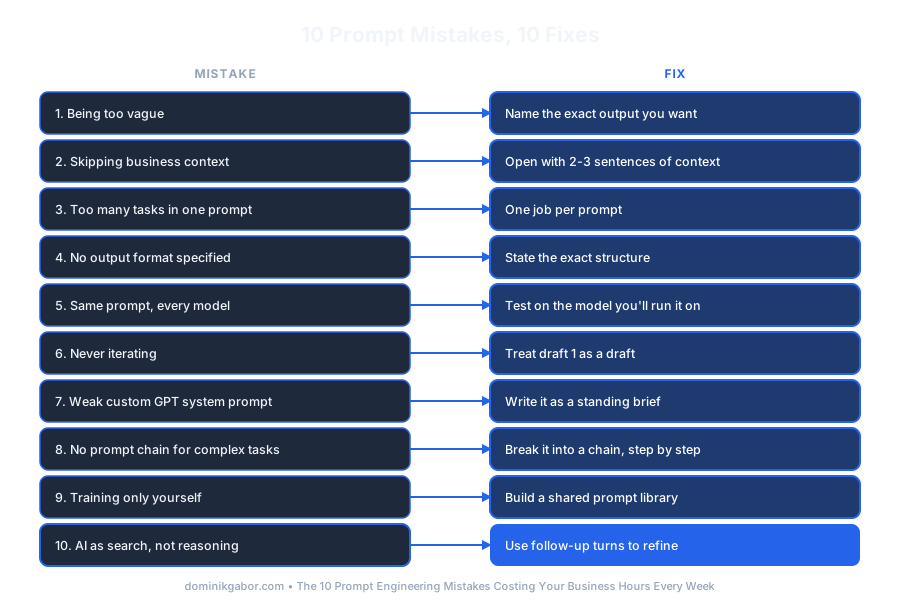
Save or share this: all 10 mistakes and fixes in one view.
Find out which prompt is costing you the most hours
Most businesses have one or two prompts running dozens of times a week that are quietly underperforming. In 30 minutes we'll look at where your team relies on AI most and pinpoint the fix worth making first.
- The prompt mistake costing you the most hours right now
- Whether the fix is a rewrite or a full workflow change
- A specific next step, not a general prompting lesson
30 minutes. No obligation. No pitch unless you ask for one.
Or grab the free resources first →
About Dominik Gabor
AI Automation Consultant based in the Netherlands. Dominik helps small and mid-size businesses get reliable results from AI, starting with the prompts most teams get wrong first. He has spent 6-7 hours a day for 2 years testing 27+ AI tools, and writes to give business owners the specific fix, not the general advice.