
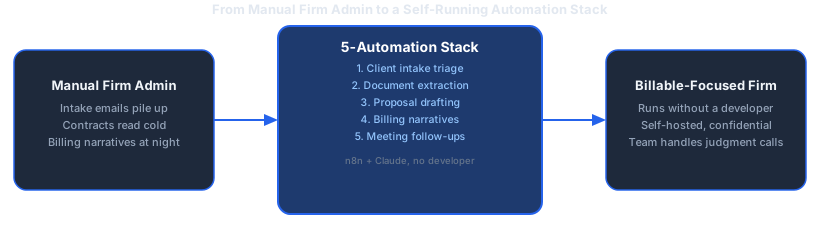
A professional services firm runs on billable hours, but not every hour is spent using expertise. The same intake email, the same contract clause pulled out by hand, the same billing narrative written from scratch, five, ten, fifty times a month. None of it requires judgment. All of it takes time away from client work.
Dominik Gabor, an AI automation consultant based in the Netherlands, has adapted AI automation for professional services firms using the same two-tool stack he uses across other SME projects: n8n for the workflow layer, Claude for the writing and reasoning step. The pattern holds across firm types, law, accounting, consulting, engineering. The tasks that eat the most non-billable hours are the ones with the least variation, which makes them the easiest to hand to AI first.
This guide covers five automations any SME professional services firm can set up without a developer or an IT department, what each one needs, and where they fit into a wider automation plan.
AI automation for professional services firms connects a firm's existing tools, its intake form, document storage, time-tracking system, and inbox, through a workflow tool like n8n, then adds an AI step (usually Claude) that classifies, extracts, drafts, or summarizes. A partner or associate defines the logic once. The system runs it on every new inquiry, document, or meeting, without anyone repeating the same manual step.
Key Takeaways
- 5 automations, one stack: Client intake triage, document review, proposal/SOW drafting, billing narrative writing, and meeting follow-ups all run on n8n + Claude, connected to the firm's existing tools.
- No developer or IT department required: All five use visual, no-code setup through each tool's built-in connectors.
- The prompt carries the quality: The same lesson that applies across every AI automation project applies here, a specific, constrained prompt produces reliable output; a vague one doesn't.
- Confidentiality-friendly for EU firms: n8n is self-hostable, so client and case data can stay on infrastructure the firm controls.
- Start with one, not five: Pick the automation tied to the task that currently eats the most non-billable hours, get it running, then add the next.
Why AI Automation for Professional Services Firms Works So Well
Professional services work splits cleanly into two categories: judgment work and pattern work. Advising a client on strategy, arguing a case, structuring a deal, that's judgment work, and it's exactly what clients pay a firm's expertise for. Classifying a new inquiry, pulling the effective date out of a contract, writing up a billing narrative, that's pattern work. It repeats the same shape every time, which is exactly what AI automation handles well, and exactly what makes it a weaker fit for the judgment-heavy work a firm actually sells.
The other advantage is documentation. A professional services firm already generates a paper trail for almost everything: intake forms, engagement letters, time entries, meeting notes. There's no need to build a tracking system before automating; the trigger data already exists inside the practice management tool, the inbox, or the document folder the firm already uses. That's a shorter path from "we should automate this" to a working workflow than most other business functions get.
The tradeoff is that professional services firms bill by the hour, which makes non-billable admin time a direct cost rather than just an inconvenience. A partner spending an evening writing billing narratives, or an associate manually extracting contract terms, is time that isn't being billed and isn't being spent on client work either. Automation is what returns that time to one column or the other.
The 5 Highest-Impact AI Automations for Professional Services Firms
1. Client Intake and Inquiry Triage
What it does: When a new inquiry comes in through the intake form or inbox, the workflow pulls the details, and Claude classifies it against the firm's service lines and drafts a first response referencing what the firm actually offers. Routine questions, fee ranges, availability, next steps, get answered directly; anything sensitive or a potential conflict of interest gets flagged for a partner instead of auto-replied.
Tool stack: n8n + Claude + the firm's intake form or inbox + a CRM or spreadsheet tracking the pipeline
What you build: A trigger on new form submission or intake email → a classification node where Claude sorts the inquiry by service line and flags anything needing a conflict check → a drafting step for routine replies → an output node that queues the response or routes it to a partner.
2. Document Review and Data Extraction
What it does: Contracts, financial statements, and engagement letters get uploaded, and Claude extracts key fields, parties, dates, amounts, obligations, into a structured summary a professional can scan in minutes instead of reading the full document cold on the first pass. The extraction doesn't replace the review; it removes the blank-page part of it.
Tool stack: n8n + Claude + document storage (Google Drive, SharePoint, or similar) + a spreadsheet or Notion database for extracted fields
What you build: A trigger on a new file landing in a designated folder → an extraction node where Claude reads the document and returns structured fields → output to a tracking sheet or database, with a human reviewing before anything is finalized.
You are extracting key fields from a client contract for
[Firm Name]. Read the document and return only the following,
in this exact structure:

- Parties (all named parties)
- Effective date and term length
- Key obligations (one line each, plain language)
- Payment terms
- Termination clause (one-sentence summary)
- Anything unusual or non-standard (flag only, do not resolve)

Do not interpret or advise. Extraction only. If a field is not
present in the document, write "Not found" rather than guessing.

Document text: {{document_text}}
3. Proposal and SOW Drafting
What it does: Fed the intake notes and the firm's standard scope-of-work template, Claude drafts a first version of a proposal or statement of work matched to what was actually discussed, ready for a partner to edit rather than start from a blank template.
Tool stack: n8n + Claude + a template document + the intake notes source (CRM or form)
What you build: A trigger on a qualified-lead status change → a Claude node that populates the firm's SOW or proposal template with the specifics from the intake notes → an output as a draft document for partner review before it goes to the client.
4. Time Entry and Billing Narrative Automation
What it does: Turns a rough time log entry, "call w/ client re: contract, 45 min", into a properly worded, client-ready billing narrative in the firm's tone, the kind of write-up that normally eats an evening at the end of the billing cycle.
Tool stack: n8n + Claude + an export from the practice management or time-tracking tool
What you build: A scheduled or triggered export of raw time entries → a Claude node that rewrites each one into a billing-narrative sentence in the firm's standard phrasing → output back into the practice management tool or a review sheet before invoices go out.
5. Meeting Notes and Follow-Up Summarization
What it does: From a meeting transcript or recording, Claude produces a structured summary, decisions made, open items, and a drafted follow-up email, so nothing discussed on a call disappears into someone's notebook.
Tool stack: n8n + Claude + a transcription tool or the meeting platform's built-in transcript + email
What you build: A trigger on a meeting-ended webhook or a new transcript file → a Claude node that structures the summary and drafts the follow-up → an output to an email draft or a CRM note for the responsible associate to review and send.
The Automation Stack: What Actually Connects to Your Firm

All five automations above sit on the same two-tool foundation described in the complete guide to AI automation for SMEs: n8n as the workflow layer, Claude as the reasoning layer. For a professional services firm specifically, that stack maps onto Layer 1 (Communication, the intake triage and meeting follow-up automations), Layer 2 (Data, the document extraction and billing narrative automations), and Layer 3 (Content, the proposal drafting automation) of the 5-Layer Automation Stack.
Most professional services firms don't need more than this two-tool core plus their existing practice management system. The mistake is reaching for four different point tools, one for intake, one for document review, one for billing, before the first automation is even live. Start with n8n and Claude connected to what the firm already runs, prove out one workflow, then decide whether a specific extra tool earns its place.
For a firm already running several manual processes side by side, the 7-step workflow migration guide walks through how to move each one across without disrupting active client matters, audit first, prioritize by impact and effort, then build the simplest workflow first.
Common Mistakes When Automating a Professional Services Firm
Automating client-facing communication before a conflict check is built in. An intake auto-reply is only safe once the classification step routes anything ambiguous to a partner first. Skipping that step to save a bit more time is exactly where automation stops being a convenience and starts being a liability.
Writing a vague prompt and blaming the tool. "Summarize this contract" produces generic output. "Extract these six specific fields, flag anything non-standard, do not interpret" produces something a professional can actually use. The workflow is rarely the reason an automation underperforms; the prompt usually is.
Auto-sending anything with legal or financial specifics without a human review step. A drafted billing narrative or a first-pass proposal is low-risk to generate automatically. Sending it to a client without a partner reading it first is not. Keep a human in the loop for anything where a wrong detail costs a client relationship, not just a few minutes.
Trying to automate everything in the first week. This is the same failure pattern that shows up across AI projects generally, not just professional services firms: starting five workflows at once instead of finishing one. The post on why most AI projects fail covers this in more depth. For a firm, the fix is the same: one workflow, running reliably, before the next one starts.
AI Automation for Netherlands and EU-Based Professional Services Firms
For a Dutch, German, or other EU-based firm, the confidentiality question comes up early, and reasonably so: client files, financial records, and case details are both personal data under GDPR and, for law firms and accountancies, subject to separate professional confidentiality obligations. Because n8n can be self-hosted, an EU firm can run all five automations above without client data leaving infrastructure it controls, which is a materially easier compliance story than routing that same data through several third-party SaaS point tools with their own separate data-processing terms.
Find out which admin task to automate first
Every firm's biggest time drain is different. In 30 minutes we map your intake volume, document review, and billing workload against the 5-automation stack and find the one worth building first.
- Which manual task is costing you the most non-billable hours right now
- Whether your current tools already support the automation
- A realistic setup timeline for your firm
30 minutes. No obligation. No pitch unless you ask for one.
Or grab the free resources first →Where This Fits Into a Full AI Operating System
The five automations in this guide are a starting stack, not the finished picture. Run individually, each one saves real time. Connected into a single system, with shared context about the firm's tone, engagement templates, and client history, they compound instead of operating as five separate tools that each need their own maintenance.
That's the difference between a handful of workflows and an AI Operating System: a done-for-you build with a defined folder structure, memory of the firm's specifics, connected tools, and documentation, typically delivered in 22-30 days and priced per project on the value it creates. For a firm that wants proof first, a Starter Build puts one automation live in two weeks, from €1,000 excl. BTW, measured before and after in the firm's own numbers.
Frequently Asked Questions
What is AI automation for professional services firms?
AI automation for professional services firms connects a firm's existing tools, its intake form, document storage, time-tracking system, and inbox, through a workflow tool like n8n, then adds an AI step (usually Claude) that classifies, extracts, drafts, or summarizes. A partner or associate defines the logic once, and the system runs it on every new inquiry, document, or meeting without repeating the manual step.
How much does AI automation cost for a professional services firm?
Tool subscription costs stay low: n8n's self-hosted tier is free to run, and Claude's usage-based API cost scales with document and inquiry volume rather than a flat monthly fee. With AI consultant Dominik Gabor, the first step is a free 30-minute AI Profit Assessment, and the first paid step is a Starter Build: one automation live in two weeks, from €1,000 excl. BTW. A full done-for-you build, the AI Operating System, is priced per project on the value it creates.
Which AI tools work best for automating a professional services firm?
For European professional services SMEs, n8n is the strongest workflow layer: self-hostable, GDPR-friendly, and it connects to most practice management tools, document storage platforms, and inboxes. Claude handles the AI reasoning step, drafting intake replies, extracting contract terms, and writing billing narratives in the firm's own voice. That combination covers every automation in this guide without needing a developer.
Can a small professional services firm automate without a developer or IT department?
Yes. n8n and Claude both use visual, no-code setup: connect the firm's inbox, document storage, and practice management tool through built-in credential fields, define a trigger such as a new inquiry or a new document, and add a Claude step with a clear prompt. Most firms get their first automation live within a few hours, then add the next one once the pattern is familiar.
The Bottom Line
Professional services firms are a strong fit for AI automation because the highest-volume admin tasks, intake triage, document review, proposal drafting, billing narratives, and meeting follow-ups, are also the most repeatable, while the judgment work a firm actually sells stays entirely human. n8n and Claude cover all five without a developer, and an EU firm can run the whole stack self-hosted for client confidentiality peace of mind. Start with the task currently eating the most non-billable hours, not the one that sounds the most impressive.
None of these five automations require replacing the firm's practice management system or changing how client work actually gets done. They connect to what's already there and take over the parts of the week that don't need a professional's judgment.
Pick one. Get it running reliably. The second automation takes less time to set up than the first, because the pattern, trigger, Claude step, output, is already familiar.
The Complete Picture
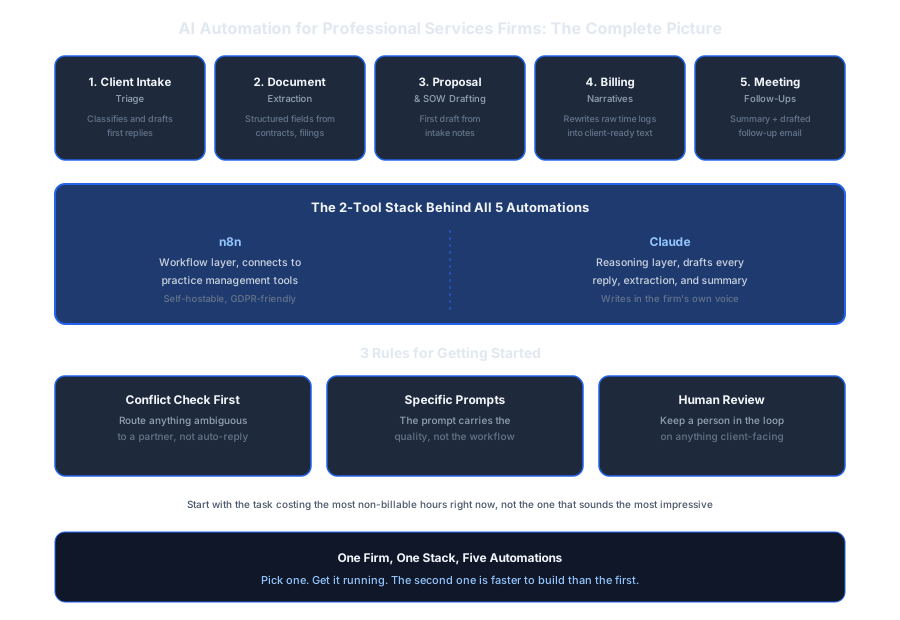
Save or share this, it's the full breakdown in one view.

About Dominik Gabor
AI Automation Consultant based in the Netherlands. Dominik helps small and mid-size businesses, including law firms, accounting firms, and consultancies, implement AI automation that runs without a developer on staff. He has spent 2+ years testing 27+ AI tools daily, and writes to give firm owners the exact, practical starting points most AI content skips over.