
You already know which task you hate. It is the one your team does every week, by hand, the same way every time, and it eats hours nobody can get back. The question is not whether it can be automated. The question is how to move it from manual to automated without breaking the thing that currently works.
Most teams get this wrong by trying to automate the whole process in one weekend. Manual to automated workflow migration works far better as a phased move: one workflow at a time, starting semi-automated, with a person still in the loop until the system earns trust. Across two years of building automations for European SMEs, the migrations that stuck were never the big-bang rebuilds. They were the boring, staged ones. Dominik Gabor, an AI automation consultant based in the Netherlands, has run this same sequence on lead intake, invoicing, and reporting workflows, and the pattern holds every time.
It is the process of moving a task you currently do by hand into a system that runs it automatically. Migration covers mapping the manual steps, rebuilding them as automated actions, testing the two versions side by side, and switching over once the automated version proves reliable.
Key Takeaways
- Migrate one workflow at a time: Big-bang rebuilds of complex processes are the most common reason automation fails.
- Map the real process first: Document the silent exceptions the human catches without thinking. If you cannot draw it, you cannot automate it.
- Pick high-volume, rule-based, low-risk: Lead intake, invoicing, and reports beat your hardest, most judgment-heavy process as a first target.
- Start semi-automated: Keep a human approval step before anything irreversible. You get most of the time savings with a safety net.
- Parallel-test before you commit: Run both versions on the same inputs across a full cycle. This surfaces every edge case with no real-world cost.
Why Most Workflow Migrations Fail
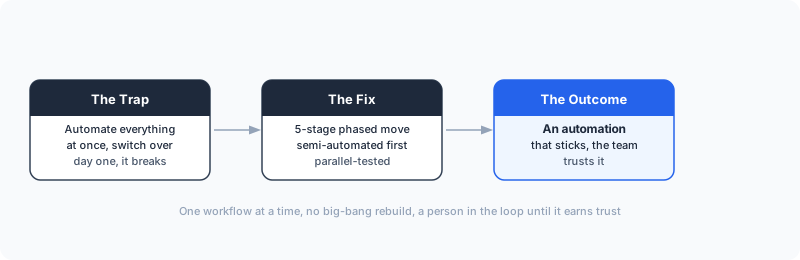
There is one trap that catches most teams, and it is not technical. They pick their most complex, most important process, try to automate every step at once, and switch off the manual version the day the new one goes live. Then the first edge case hits, the automation does something wrong, and trust collapses. The team quietly goes back to doing it by hand.
It is worth knowing how common this is, because it tells you where the real work is. An MIT study of AI in business found that 95% of companies saw zero return or "little to no measurable impact" from their AI investments, largely because the tools did not adapt to how the company actually worked (MIT, 2025). The encouraging part: the technology is rarely the cause. The cause is scope and sequence, and both are things you control. Automate too much too fast, with no parallel period to catch what the manual process handled silently, and it breaks. Stage it properly and it holds.
For Dutch SMEs specifically, this matters more, because most do not have a dedicated automation team to fix things when they break. The migration has to be safe by design, not safe because someone is watching it full time.
The 5-Stage Workflow Migration Framework

Here is the sequence that works. Each stage has one job, and you do not move to the next until the current one is solid.
Stage 1: Map the manual workflow exactly
Before you automate anything, write down what actually happens, not what is supposed to happen. Sit with the person who does the task and record every step, every decision, and every exception they handle without thinking about it. That last part is where migrations break. The human is silently catching bad data, weird formats, and special cases, and none of it is documented.
Output of this stage is a step-by-step map with the decision points marked. If you cannot draw the workflow, you are not ready to automate it.
Stage 2: Pick the right first workflow
Not every process should be migrated, and definitely not first. The right first workflow is high-volume, rule-based, and low-risk. High volume so the time saved is real. Rule-based so it can run without a human judgment call on every item. Low-risk so a mistake costs you minutes, not a client relationship.
Lead intake, invoice data entry, and recurring report generation usually score well on all three. Your most complex, judgment-heavy process is the worst place to start, even though it is the one causing the most pain. Earn the win on an easy one first.
Stage 3: Build it semi-automated
This is the stage teams skip, and skipping it is the mistake. Do not automate end to end on day one. Build the system so it handles the repetitive steps and then stops for a human to approve before anything irreversible happens. The automation drafts the invoice; a person clicks send. The automation researches the lead; a person reviews before it enters the CRM.
Semi-automation is the recommended starting point for SMEs precisely because it relieves the team of repetitive steps while keeping humans involved in decisions that require judgment (Activepieces, 2026). You get most of the time savings immediately, and you get a safety net while the system proves itself. Tools like n8n, Make, and Claude are all built to support this approve-before-action pattern.
Stage 4: Run both versions in parallel
For a defined period, run the automated workflow alongside the manual one. Same inputs, both produce output, and you compare. This is the test phase, and it is the single most protective step in the whole migration. It surfaces every edge case the original map missed, without any real-world consequence if the automation gets one wrong.
A phased approach with parallel testing mitigates operational risk and prevents costly downtime, which is why implementation guides consistently recommend piloting on non-critical workflows before scaling (Zigpoll, 2025). Keep this phase running until the automated version matches the manual one across a full cycle of normal and weird cases.
If you want to see how this maps to your specific workflows, book a free AI Profit Assessment and we will identify the first workflow worth migrating.
Stage 5: Switch over and monitor
Only now do you turn off the manual version. Even then, you do not walk away. Keep monitoring outputs, validate the data the automation produces, and keep the documentation current so anyone can audit what the system does. Migration is not finished when the automation goes live. It is finished when it has run clean through a full cycle without a human catching anything.
What This Looks Like in Practice
Take lead intake, a process almost every SME runs by hand. The manual version: a lead fills in a form, someone copies the details into the CRM, looks up the company, writes a few notes, and assigns it to the right person. Fifteen minutes per lead, multiplied across a week, is real time.
Migrating it followed the framework exactly. Stage 1, I mapped every step with the person doing it, including the silent ones, like how they guessed the company size from the email domain. Stage 2 confirmed it was a good first candidate: high volume, mostly rule-based, low risk if a note came out wrong. Stage 3 built it semi-automated in n8n, so the system pulled the company data and drafted the CRM entry, then waited for a person to approve before it saved. Stage 4 ran both versions for two weeks, and that is where I caught the edge cases: leads with no company, personal email addresses, duplicate submissions. I spent maybe two hours fixing the data mapping for those. Stage 5 switched it over.
This is the kind of work two years and 27 plus tools of testing teaches you: the build is the easy part. The discipline of mapping, piloting, and parallel-testing is what separates an automation that sticks from one the team abandons. I have run this same five-stage sequence for European SME clients across intake, invoicing, and reporting, and the failures only ever came from skipping a stage, never from the tools.
Your Migration Checklist
When you migrate your first workflow, run it against this:
- Map it by hand first. Document the real steps and the silent exceptions. No map, no migration.
- Choose high-volume, rule-based, low-risk. Not your hardest process. Your safest meaningful one.
- Build semi-automated. Keep a human approval step before anything irreversible.
- Run both versions in parallel. Compare outputs across a full cycle before you trust it.
- Switch over, then monitor. Live is not done. Watch it through one clean cycle.
If you want concrete starting points, the no-code AI automation ideas post lists workflows that tend to migrate cleanly, and the free resources page has templates you can adapt.
Frequently Asked Questions
What is workflow migration in automation?
Workflow migration is the process of moving a task you currently do by hand into a system that runs it automatically. It covers mapping the manual steps, rebuilding them as automated actions, testing in parallel, and switching over once the automated version proves reliable. The goal is the same output with less human time spent.
Should I automate a whole process at once or in stages?
In stages. Start semi-automated, where the system handles the repetitive steps and a person still approves decisions that need judgment. As trust builds, you remove the manual checkpoints. Trying to fully automate a complex process in one move is the most common reason migrations fail.
How do I choose which manual workflow to migrate first?
Pick the workflow that is high-volume, rule-based, and low-risk if it makes a mistake. High volume means the time savings are real. Rule-based means it can be automated without constant exceptions. Low risk means a bug costs you minutes, not a client. Lead intake, invoice processing, and report generation usually fit all three.
How long does it take to migrate one workflow from manual to automated?
A single well-scoped workflow usually takes a few days to a couple of weeks, depending on how many tools it touches and how clean the data is. The build is rarely the slow part. Documenting the manual steps accurately and running the parallel test phase take the most time, and skipping them is what causes problems later.
The Bottom Line
Manual to automated workflow migration works when you treat it as a staged move, not a switch you flip. One workflow at a time, semi-automated first, parallel-tested before you commit.
The teams that succeed at automation are not the ones with the best tools. They are the ones who migrate carefully: map the real process, pick a safe first target, keep a human in the loop until the system earns trust, and test both versions side by side before switching. The technology has been ready for years. The discipline is what people skip.
Migrate one workflow well, and the second one is easier, because now your team believes it works.
The Complete Picture
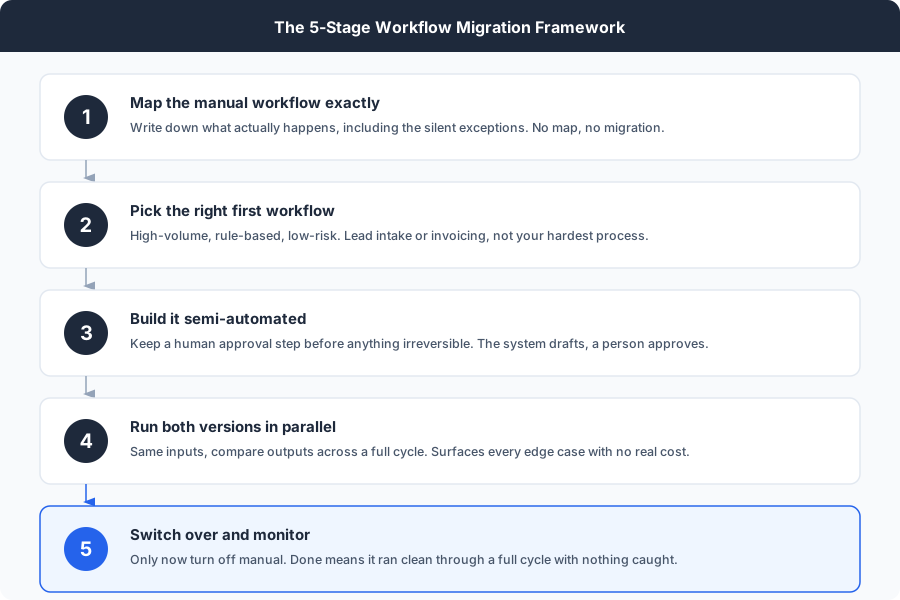
Save or share this, it's the full framework in one view.
Which workflow should you migrate first?
Most teams pick the wrong one and stall. In 30 minutes we map your manual processes together and you walk away with a clear answer: the single best workflow to migrate first, what it is costing you to keep doing by hand, and the staged plan to move it.
- Your highest-ROI workflow to migrate, named
- The real hours and cost it is burning now
- A phased plan you can start this week
30 minutes. No obligation. No pitch unless you ask for one.
Or grab the free workflow templates first →References
- Activepieces. (2026). Workflow automation for small businesses: A 2026 guide. activepieces.com
- MIT. (2025). The GenAI divide: State of AI in business 2025 [Study]. As reported in Entrepreneur. entrepreneur.com
- Zigpoll. (2025). Execute workflow automation implementation: A step-by-step guide to enterprise migration. zigpoll.com

About Dominik Gabor
AI Automation Consultant based in the Netherlands. Dominik helps small and mid-size businesses migrate manual workflows to automated systems, from lead intake to invoicing to weekly reporting. He has spent 2+ years testing 27+ AI tools daily, and writes to give business owners the exact, practical starting points that most AI content skips over.