
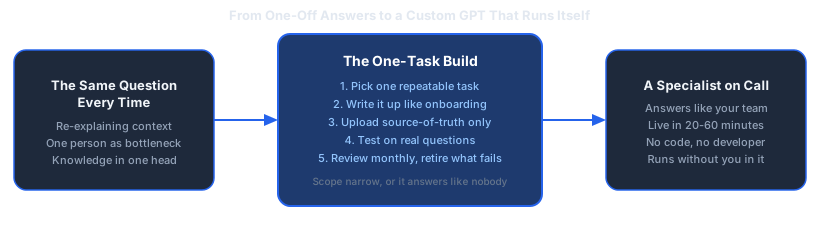
Most SME owners have used ChatGPT for a specific task, gotten a decent answer, and then had to re-explain their entire business context the next time they opened a new chat. That re-explaining is the tax nobody talks about. It's the same five minutes, spent over and over, by everyone on the team who touches the tool.
Dominik Gabor, an AI automation consultant based in the Netherlands, sees this pattern in nearly every SME he works with: the team already trusts AI enough to use it daily, but nobody has configured it to actually know the business. A custom GPT for business fixes exactly that gap, and it doesn't require a developer, a budget line, or a multi-week project to get the first one running.
This guide covers what a custom GPT for business actually is, the use cases that pay back the fastest, and the exact no-code steps to build, test, and roll out your first one this week. It also covers the mistakes that quietly kill most first attempts, when a document-based assistant stops being enough and you need it connected to live business data, and how a custom GPT fits next to chatbots and full AI agents so you're building the right tool for the job, not just the most talked-about one.
A custom GPT is a version of ChatGPT that you configure once with your own instructions, uploaded documents, and settings, so every conversation with it starts already knowing your business. You write the brief a single time. Every teammate who opens it afterward gets the same context, the same tone, and the same source material, without typing a word of setup.
Key Takeaways
- One task, not one assistant: the custom GPTs that actually get used are scoped to a single repeatable job, not a general "ask me anything about the business" bot.
- No code for the standard build: the built-in GPT Builder is a form. Code is only needed for advanced API connections to live business data.
- 20-60 minutes to build, longer to trust: the click-through setup is fast. Testing against real questions is what actually takes time, and skipping it is the most common reason a custom GPT gets abandoned.
- Fewer documents beat more documents: uploading your entire shared drive produces worse answers than uploading the three documents that actually contain the answer.
- Maintenance is not optional: a custom GPT with a stale pricing sheet is worse than no custom GPT at all, because people trust the wrong answer.
What a Custom GPT Actually Is (and Isn't)
Strip away the jargon and a custom GPT is a saved configuration. It bundles four things together: a set of written instructions telling the model who it is and how to behave, a library of documents it can reference, a small number of optional capabilities (web browsing, image generation, code execution), and, for advanced setups, connections to outside tools through API actions.
None of that is complicated on its own. What makes it useful is that the configuration is saved and shared. Instead of every person on your team pasting the same context into ChatGPT before every question, the context lives inside the GPT itself. Ask it something, and it already knows your pricing tiers, your tone of voice, or your return policy, because you told it once and it remembers every time after that.
It's worth being precise about what a custom GPT for business is not. It's not a chatbot with hard-coded decision trees, and it's not an autonomous system that takes actions on its own without being asked. It answers when prompted, using the instructions and documents you gave it, inside a normal chat interface. That makes it the lowest-effort, lowest-risk way for an SME to get a genuinely useful AI assistant live this month, not next quarter.
The closest real-world comparison is onboarding a new employee. You wouldn't hand someone a stack of every document your company has ever produced and expect a great first week. You'd give them the handful of documents that matter for their specific role, a clear brief on tone and expectations, and a few worked examples of what good looks like. A custom GPT learns the same way, just faster, and it never forgets what you told it.
Why Every SME Should Have at Least One by the End of 2026
The bar for "worth building" is lower than most owners assume. Any task where someone on your team answers the same type of question repeatedly, using information that already exists somewhere in writing, is a candidate. That covers more of a typical SME's week than most owners realize once they actually list it out.
The value isn't abstract. According to AI consultant Dominik Gabor, 10+ hours a week saved is the standard outcome once a business has two or three of these narrow, well-scoped AI tools running instead of zero. A single custom GPT rarely delivers that on its own. The compounding effect shows up once the team stops treating each one as a novelty and starts routing real work through it by default.
For SMEs in the Netherlands and Germany specifically, there's an additional argument for starting now rather than waiting: both markets carry a tight labor market and high wages relative to the rest of the EU, so every hour a custom GPT removes from a skilled employee's week is worth more, and the payback period on the time invested building it is shorter than it would be in a lower-wage market.
There's also a competitive angle worth naming plainly. The businesses already running two or three well-scoped custom GPTs aren't necessarily doing more advanced AI work than everyone else. They just started earlier, fixed the rough edges over a few weeks, and now treat the tool as background infrastructure instead of a novelty. The gap between "we tried ChatGPT once" and "we have a support responder the whole team trusts" is measured in a handful of focused hours, not in specialist headcount.
None of this requires an "AI-first" transformation project. It requires picking one task and getting it right, which is the entire premise of the next section.
The Highest-ROI Custom GPT Use Cases for SMEs

Not every task deserves its own custom GPT. The ones that pay back fastest share three traits: they're repetitive, they draw on information that's already written down somewhere, and getting them slightly wrong is cheap to fix, not catastrophic. Here are the use cases that consistently deliver the fastest payback for SMEs:
- Customer support auto-responder: trained on your FAQ, policies, and past support answers, drafting first-response replies for your support team to review and send. Typically saves 2-4 hours a week once the source documents are solid.
- Internal knowledge base assistant: trained on your SOPs, onboarding docs, and internal wiki, answering the questions new hires and existing staff currently interrupt a manager to ask. Frees up the most senior person on the team from being the human search engine.
- Content drafting and brand voice enforcer: trained on your published content and voice guidelines, drafting first passes of blog posts, social captions, or email copy in a consistent tone. Cuts first-draft time roughly in half for whoever currently starts from a blank page.
- Sales email generator with context: trained on your offer, pricing, and past winning emails, drafting personalized outreach and follow-ups that still need a human read before sending. Most useful for teams sending 10+ personalized emails a week.
- Meeting summarizer and action item tracker: given a call transcript, producing a structured summary with owners and next steps instead of someone typing notes by hand. Removes 15-30 minutes of manual note-writing after every call.
For a deeper breakdown of these use cases, including which ones teams actually keep using past the first month versus which ones quietly get abandoned, see the full custom GPT use cases for business post.
Which One Fits Your Type of Business
The five use cases above apply broadly, but the order you'd tackle them in shifts depending on what kind of business you run. An e-commerce operation with a high volume of near-identical customer questions usually gets the fastest payback from the support responder, since order status, returns, and sizing questions repeat constantly and rarely need judgment. A professional services firm, an agency, a consultancy, a bookkeeping practice, tends to see faster value from the internal knowledge base assistant or the sales email generator, since the bottleneck is usually a senior person's time, not ticket volume. A logistics or operations-heavy business often gets the most out of the meeting summarizer and a narrowly scoped internal assistant trained on SOPs, since the biggest cost is inconsistent execution of a documented process, not a lack of documentation.
Pick the one where the pain is most visible right now, not the one that sounds most impressive in a meeting. A support responder that saves two hours a week and actually gets used beats a company-wide assistant that took a week to configure and gets opened twice a month.
Step-by-Step: Building Your First Custom GPT
This is the part that takes 20-60 minutes of clicking, and a few hours of testing spread across the following week. Here's the sequence, in order:
1. Pick one task, not a job title
Resist the instinct to build "a marketing assistant" or "an ops assistant." Those are job titles, not tasks, and a GPT built around a job title ends up shallow at everything instead of genuinely useful at one thing. Write down the single question or request that comes up most often, verbatim if you can, and build for that.
2. Write instructions like you're onboarding a new hire
The instructions field is where most of the quality comes from, not the documents. Tell it who it is, what it should and shouldn't do, the tone to use, and give 2-3 worked examples of a genuinely good answer. Treat it exactly like a briefing document for someone's first day.
You are the first-response drafting assistant for [Company Name].
Role: Draft replies to customer support questions for a human to review before sending.
Tone: Warm, direct, no corporate jargon, matches our existing support replies.
Always do: Reference the specific policy or pricing tier when relevant.
Never do: Promise a refund, discount, or timeline that isn't in the source documents.
If you don't know the answer from the source documents, say so directly
and flag it for a human instead of guessing.

Example good reply structure:
1. Acknowledge the specific issue in one sentence.
2. Give the direct answer, referencing the relevant policy.
3. Offer one clear next step.
3. Upload only source-of-truth documents
Add the specific documents that actually contain the answer: your current pricing sheet, your SOP for the task, your policy document, your top 20 past support replies. Skip your entire shared drive. More documents does not mean better answers. It usually means the model has to guess which of ten conflicting versions of a document is current, and it guesses wrong more often than you'd expect.
4. Set the tone and output format
Be explicit about structure: how long should answers be, should they use bullet points or prose, should they end with a specific call to action. Vague instructions produce vague, generic output. Specific instructions about format produce the same quality answer every time, which is what makes a custom GPT trustworthy enough for a team to actually rely on.
5. Add only the capabilities it actually needs
Web browsing, code execution, and image generation are optional toggles. Turn them on only if the task genuinely requires them. A knowledge base assistant answering from your own documents doesn't need web browsing, and turning it on anyway just adds a way for it to pull in an outside answer that contradicts your internal policy.
6. Test with real questions, not demo questions
This is the step most SMEs skip, and it's the one that decides whether the GPT gets used or abandoned. Run the actual questions your team asks, including the awkward edge cases and the ones with no clean answer in your source documents. If it gives a confident wrong answer to an edge case, that's an instructions problem to fix before rollout, not a launch-and-see-what-happens problem.
7. Roll out to one team, gather feedback
Share it with the smallest group that would realistically use it every day, for one to two weeks, before opening it up further. Ask them to flag every wrong or unhelpful answer, not just tell you it's "pretty good." Specific failure reports are what let you fix the instructions before a larger group loses trust in it.
8. Activate it as the default, not a side experiment
Once testing looks solid, make using it the default way that task gets done, not an optional extra someone might remember to try. A custom GPT that's technically live but nobody opens is functionally the same as not having built it.
Most people complete steps 1-8 for their first custom GPT within a week, and the second one takes a fraction of the time because the instructions-writing skill transfers directly.
What the First 30 Days Actually Look Like
Take a hypothetical example: a 15-person marketing agency where two account managers each spend roughly 3 hours a week answering the same handful of client questions about pricing tiers, timelines, and what's included in each package. Neither question requires judgment. Both are answered from documents that already exist, just scattered across old email threads and one account manager's memory.
- Week 1: The owner picks the task (client pricing and scope questions), gathers the three documents that actually contain current answers, and spends about 45 minutes writing instructions and building the GPT. First test round surfaces two gaps in the source documents that nobody had noticed were missing.
- Week 2: Both account managers test it against real client questions from the past month, flagging four answers that were close but not quite right. The instructions get tightened, and one outdated pricing reference gets corrected in the source document.
- Week 3: The team starts using it as the default first step before answering a client question themselves, rather than as a novelty they remember to try occasionally. Roughly 60% of routine questions now get a usable first draft from the GPT.
- Week 4: The pattern has stabilized enough that the owner sets a monthly calendar reminder to review it, and starts scoping a second GPT for a different repetitive task, this time in half the setup time because the instructions-writing process is now familiar.
Nothing in that timeline requires a developer, a budget line, or a project manager. It requires one person's focused hour in week one, and a habit of testing before trusting, which is the difference between a custom GPT that gets adopted and one that gets built once and forgotten.
Connecting Your Custom GPT to Business Data (Advanced)

Uploaded documents work well until the underlying data changes daily, such as live inventory counts, open support tickets, or current CRM records. At that point, a static document is stale the moment it's uploaded. This is where custom GPT actions come in: a way to connect the GPT to a live system through an API, so it queries current data instead of a snapshot.
This step genuinely does require either a developer or a pre-built connector, and it's worth treating as a separate project once the basic, document-based version is already proven useful. Jumping straight to a live CRM connection before you know the underlying instructions and scope are right is how SMEs end up with an expensive, half-working integration nobody trusts.
For the full step-by-step on this specific connection, including which authentication approach to use and how to scope API access safely, see how to connect a custom GPT to your CRM. The short version: start read-only, prove it's useful, then decide whether write access is worth the added risk.
Custom GPT vs. AI Agent vs. Chatbot: Where This Fits
These three terms get used interchangeably, and that's where a lot of SMEs pick the wrong starting point. A rough but useful way to separate them:
| Type | What it does | Takes action on its own? | Setup effort |
|---|---|---|---|
| Chatbot | Follows scripted rules and decision trees | No | Low to medium |
| Custom GPT | Answers and drafts, using your instructions and documents | No, answers when asked | Low, no code for the standard build |
| AI Agent | Takes multi-step actions across tools toward a goal | Yes, often with limited supervision | Medium to high |
A chatbot is a scripted receptionist. A custom GPT is a trained specialist who answers when you ask. An AI agent is closer to an autonomous employee, taking steps without someone prompting each one. The setup effort and the risk both increase in that order, and so should your starting point.
For nearly every SME, the sensible sequence is custom GPT first. Get one or two genuinely useful and trusted by the team, and only then consider agent-style automation for the workflows where a human checking every step has become the actual bottleneck. For a broader view of building a full automation system rather than individual tools, see the complete guide to AI automation for SMEs.
A simple test for which one you actually need: if the task ends with someone reading an answer and deciding what to do next, build a custom GPT. If the task ends with an action actually being taken, an email sent, a record updated, a ticket closed, without a human in the loop, you're describing an agent, and that's a bigger, riskier build that deserves more testing before it touches anything live.
The Tools You Actually Need
Building a custom GPT requires less than most owners expect. For the standard, document-based build:
- A ChatGPT Plus, Team, or Enterprise subscription: the GPT Builder is included, no separate purchase needed.
- Your existing documents: pricing sheets, SOPs, policy docs, past replies. Nothing needs to be created from scratch.
- Thirty minutes of one person's focused time: for the build itself, plus testing time spread across the following week.
For the advanced, API-connected version described above, add a developer or a pre-built connector, plus whatever access credentials the target system (CRM, inventory tool, ticketing system) requires. Resist the urge to buy additional tooling before you've built and tested the basic version. Most SMEs only need one platform to get real value from their first two or three custom GPTs.
A quick note on plan tiers, since it trips people up: an individual ChatGPT Plus subscription is enough to build and use a custom GPT for yourself or share it with a small group. A Team or Enterprise plan adds proper workspace-level sharing, so the whole company sees the same version instead of everyone building their own slightly different copy, plus admin controls over who can edit the instructions and documents. If more than two or three people will rely on the same custom GPT daily, the Team tier pays for itself in avoided version drift alone.
Common Mistakes That Make Custom GPTs Useless
- Building a general assistant instead of a specific tool. "Ask me anything about the business" produces shallow, generic answers. Fix: rename the project around the single task before you write a single instruction, so scope creep has nowhere to hide.
- Uploading everything instead of the source of truth. Conflicting or outdated documents confuse the model more than missing documents do. Fix: pick the three to five documents you'd hand a new hire on day one, and start there.
- Skipping the testing step. A GPT that hasn't been tested against real, awkward questions will eventually give a confidently wrong answer in front of a customer or a client. Fix: pull the last 20 real questions your team actually got asked and run every one before rollout.
- Vague instructions about tone and format. Without explicit formatting rules, output quality varies wildly from one question to the next. Fix: paste in one example of a genuinely good answer, formatted exactly how you want every future answer to look.
- No owner assigned after launch. A custom GPT with nobody responsible for updating it drifts out of date within a few months. Fix: name one person, even if it's you, and put the monthly review on a calendar before launch day.
- Treating it as a one-time project instead of a maintained tool. The businesses that get lasting value review and update their custom GPTs on a schedule, not only when something breaks visibly. Fix: treat the monthly review as seriously as you'd treat updating a price list, because functionally that's what it is.
Every one of these is avoidable with the scoping and testing steps covered earlier. The pattern behind all six mistakes is the same: treating the build as the finish line instead of the starting point.
When to Build It Yourself vs. When to Hire Help
DIY makes sense for most SMEs' first custom GPT. The standard build requires no code, the tools are already included in a ChatGPT subscription you likely already pay for, and the skill of writing clear instructions is one you'll reuse for every future GPT you build.
Hiring help makes more sense once you're past the first one or two and want to connect a GPT to live business data through an API, once you want several GPTs working together as a coordinated system rather than isolated tools, or once your team has tried DIY and hit a wall they can't get past with the built-in documentation. Build the machine, not just do the work applies directly here: the goal isn't for you personally to become skilled at prompt engineering, it's a system that runs the task without you or your team babysitting it.
If you're not sure which task to start with, or whether your business is better served by one custom GPT or a broader automation system, a free 30-minute AI Profit Assessment identifies the highest-impact starting point for your specific business before you spend any time building.
There's a third, quieter signal worth watching: how much of your own time gets pulled into troubleshooting after launch. A custom GPT that keeps generating support questions from your own team, rather than answering questions for them, has usually skipped the testing step covered earlier, and it's often faster to bring in help to fix the instructions properly than to keep patching it piecemeal.
Keeping Your Custom GPT Useful Over Time
A custom GPT is not a launch-and-forget tool. Source documents go stale. Pricing changes. New failure modes surface as more people use it and ask questions you didn't anticipate during testing.
Set a recurring monthly reminder to do three things: update any document that's changed since the last review, read through recent conversations for wrong or unhelpful answers and fix the underlying instructions, and check whether the GPT is still actually being used. A custom GPT nobody has opened in a month is either solving the wrong problem or has lost the team's trust, and either way it's worth investigating rather than leaving it running unattended.
This is also the point where a genuinely useful custom GPT starts revealing what's next: if a document-based assistant is consistently limited by not having live data, that's the signal to consider the CRM connection covered above. If your team now wants two or three of these working together, or has run out of runway to keep maintaining them without dedicated help, that's the signal to look at a done-for-you build instead of another DIY project.
One simple usage metric tells you most of what you need to know: how many conversations it had in the last week, and how many of those came from repeat users versus a single person testing it once and never returning. A custom GPT with steady repeat usage from the same two or three people is proving its value. One with a burst of curiosity in week one and silence afterward is telling you something was wrong with the scope, the instructions, or the documents, and that's worth investigating before building a second one on the same pattern.
Frequently Asked Questions
What is a custom GPT and how is it different from regular ChatGPT?
A custom GPT is a version of ChatGPT that you configure once with your own instructions, documents, and settings, so it answers as someone who already knows your business instead of a generic assistant. Regular ChatGPT starts from zero every conversation and needs the same context typed in every time. A custom GPT keeps that context built in, so anyone on your team gets a consistent, on-brand answer without re-explaining the business first.
How long does it take to build a custom GPT for my business?
The click-through part of building a custom GPT, writing instructions and uploading documents, usually takes 20-60 minutes for a single well-scoped task. Testing and refining it against real questions from your team typically adds another few hours spread over the following week. A narrow, single-task GPT is live and reasonably reliable within a few days. A broader assistant covering multiple tasks takes longer, mainly because it needs more testing, not more clicking.
Do I need to know how to code to build a custom GPT?
No. The standard no-code GPT builder inside ChatGPT is a form: you describe the assistant, upload documents, and set a few toggles. No coding is required for that path. Coding only becomes necessary if you want to connect the GPT to a live system through a custom API action, such as pulling real-time data from your CRM or inventory system, which is a separate, more advanced step most SMEs only take after the basic version is already working.
Is a custom GPT the same as an AI agent?
No, and the distinction matters for what you should build first. A custom GPT answers questions and drafts content when someone asks it to, inside a chat window. An AI agent takes multi-step actions on its own, across multiple tools, often without a human prompting each step. A custom GPT is the lower-effort, lower-risk starting point. Most SMEs are better served by getting one or two custom GPTs genuinely useful before attempting agent-style automation.
How much does it cost to build and run a custom GPT?
Building a custom GPT through OpenAI's standard builder is included in a ChatGPT Plus, Team, or Enterprise subscription, so there is no separate build fee if you do it yourself. The real cost is the hours spent scoping the task, writing instructions, and testing it properly, which is where most SMEs either succeed or produce something nobody trusts. If you'd rather have it built, tested, and documented for you, that falls under a done-for-you AI Operating System engagement instead of a standalone product.
The Bottom Line
A custom GPT for business is the lowest-effort, no-code entry point into genuinely useful AI at an SME. Pick one narrow, repeatable task, write instructions like you're onboarding a new hire, upload only the documents that actually contain the answer, and test it against real questions before anyone relies on it. Most businesses go from a blank builder screen to a working first version in under an hour, and from "built" to "actually trusted by the team" within a couple of weeks of real use and small fixes.
Start with the task that's most visibly annoying right now, not the one that sounds most impressive. Get it right once, and the second one is faster, because you already know how to write the instructions that make the first one work. The businesses that stall out on custom GPTs almost never fail because the technology couldn't do the job. They fail because nobody scoped the task narrowly, tested it properly, or came back a month later to keep it current. Fix those three things and a custom GPT stops being a novelty and starts being infrastructure.
The Complete Picture
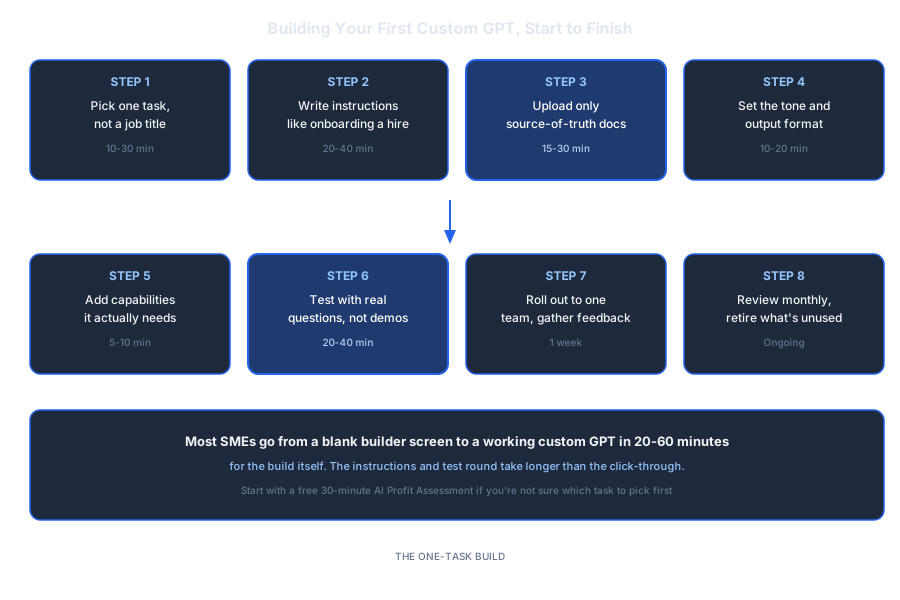
Save or share this: it's the full build process in one view.
Find the one task worth automating first
Not every task deserves its own custom GPT, and picking the wrong one is how first attempts get abandoned. In 30 minutes we find the task in your business with the fastest payback and the clearest source documents to build from.
- The single highest-payback task in your business
- Whether a custom GPT or fuller automation fits it
- What source documents you already have ready to use
30 minutes. No obligation. No pitch unless you ask for one.
Or grab the free resources first →
About Dominik Gabor
AI Automation Consultant based in the Netherlands. Dominik helps small and mid-size businesses implement AI automation, from a single custom GPT to a full done-for-you system. He has spent 2+ years testing 27+ AI tools daily, and writes to give business owners the exact, practical starting points that most AI content skips over.